Security
To avoid unauthorized use of the instrument a PIN/PUK security code can be activated by the user.
PIN Code
The PIN Code is a four digit code where each digit can be set between 0-9 e.g. “1234”. The PIN Code can be activated and changed by the user.
As default the PIN Code is set to “0000”. With this code set the security is not activated and the user will not be prompted to enter PIN Code at start up.
NOTE – If the wrong code is entered more than 10 times, the instrument will be locked and the PUK Code needs to be entered.
Activate or change PIN Code
To activate the security PIN Code or change the PIN Code:
-
Press
 to scroll to Security and then press
  .
. -
Press
to scroll to Change PIN and then press . -
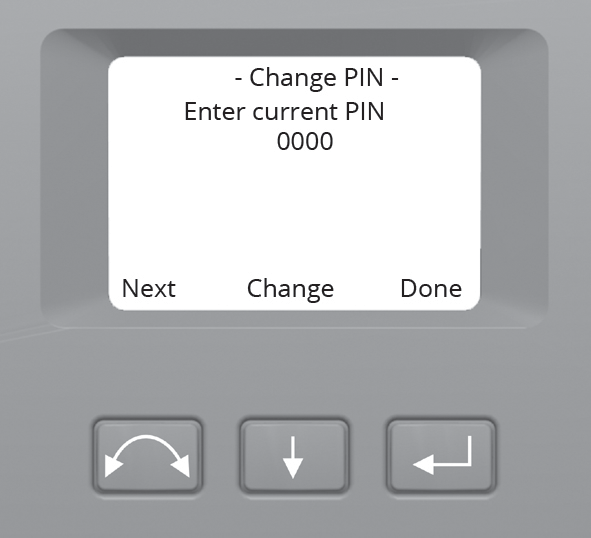
Enter the current PIN Code. The underlined digit is selected for change.
-
Press
to change the digit to the correct number. -
Press
 to select the next digit.
 -
When all four digits have been set to the correct PIN code press
.
-
-
Enter the new PIN Code of your choice and press
, follow the instructions 3a, 3b and 3c -
To confirm the PIN Code press
. -
Press
to scroll to Back.... and then press to return to the Setup menu.
Unlock instrument with PIN Code
When the security PIN Code has been activated, the PIN Code needs to be entered at start up.
When the instrument is locked, the locked icon  shows in the top right of the display.
To unlock the instrument select Unlock Instrument and press
NOTE – If no selection is made within 10 seconds the instrument will go to suspend mode. To return to the select mode menu press the trigger key.
The PIN code is a four digit number. The underlined digit is selected for change.
-
Press
to change the digit to the correct number. -
Press
to select the next digit. -
When all four digits have been set to the correct PIN Code press
.
If the wrong PIN Code is entered more than ten times, you will be prompted to enter the PUK Code.
When the correct PUK Code has been entered, the PIN Code will be reset to “0000”. This means that the PIN Code security will be inactivated.
PUK Code
The PUK Code is a ten digit code where each digit is set between 0-9 e.g. “0123456789”. The PUK Code can not be changed by the user.
The PUK Code is set at the factory. A document with the PUK Code is supplied to the user when the instrument is delivered. Please save this document in a safe place.
NOTE –
-
If the PUK code has been lost, contact your authorized Trimble distributor to retrieve the PUK code.
-
The PUK Code is needed to unlock the instrument if wrong PIN Code has been entered more than ten times.
You can read out the PUK Code from the instrument:
-
Press
to scroll to Security and then press . -
Press
to scroll to Get PUK and then press . -
Press
to return to the Security menu.
