TRB (TrimBIM)
TrimBIM (.trb) is a Trimble proprietary file format for efficiently storing 3D BIM geometry and attributes with in-memory fast random access. It is not a replacement for IFC or any other formats, but a more intelligent way to access model data. TrimBIM speeds up BIM processes significantly.
There are several ways to convert your model to .trb format:
- From Trimble Connect Desktop
- From Trimble Quadri
See below for details on each of these options.
 Converting data from Trimble Connect Desktop
For data on Trimble Connect, the Trimble Connect Desktop application can be used to generate a .trb file.
TIP – By selecting and viewing multiple models, this workflow can also be used to combine these models into a single TRB file. Additionally, any filters you apply within Trimble Connect Desktop will be preserved during this export. This allows you to export a specific subset of model elements based on the embedded model attributes.
- Load your model in Trimble Connect Desktop.
- In the MODELS panel on the right, click the Export current 3D view as TrimBIM model button (highlighted below).
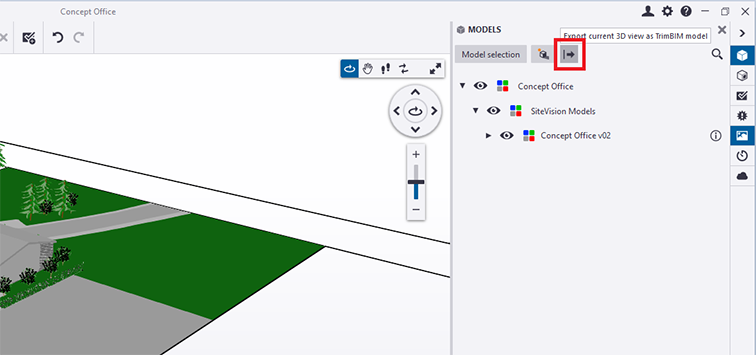
- Copy the .trb file to your device. You can then load it with the My Files workflow.
Converting data from Quadri
For data on Quadri, a .trb can be generated as an output from any 3D Presentation Task.
- Create a 3D Presentation Task containing the model data you require.
- Select the Output tab of the 3D Presentation task, then from the Publish ribbon select the TrimBIM option.
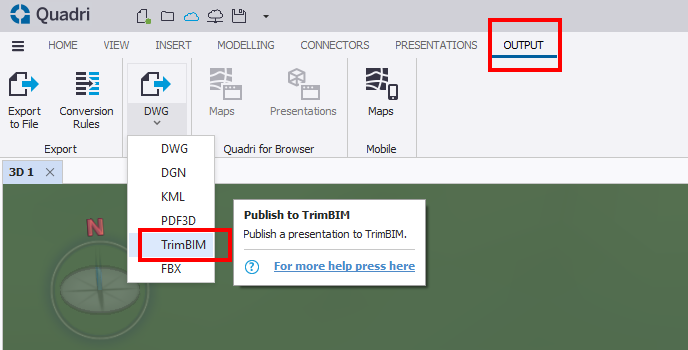
- Confirm the settings, select your preferred output location from the list of options in the External Delivery dropdown, then click Finish.

- Copy the .trb file to your device. You can then load it with the My Files workflow.
