Release Notes
This section provides all release notes for the Trimble® SiteVision™ software from the version 2025.10 release onward.
You can also view the release notes for previous versions to check when features and enhancements were added, or when specific issues were resolved.
 2026.10
Version 2026.10 of the Trimble® SiteVision™ software is available from May 2026. These Release Notes describe the new features and changes available in this release of the Trimble SiteVision software.
New Features and Enhancements
Version 2026.10 is a significant update to the existing SiteVision product. Historically SiteVision has been a 3D model visualization tool. This update greatly enhances the lidar scanning capabilities of SiteVision and provides the necessary workflows to now also position SiteVision as an affordable Reality Capture tool. While maintaining the unique model visualization capabilities customers are used to.
3D Scanning Improvements (iOS only)
Major improvements to point cloud quality and scanning workflows. Note that 3D scanning capabilities require a lidar enabled iPad Pro or iPhone Pro device. There is no support for scanning on Android devices.
-
You can now start a scan without needing to first load a 3D model
-
Scanning is now fully unlocked in poor GNSS areas or indoors (no more 10m circle restriction)
-
Scan point cloud quality has been greatly improved
-
New scan health indicator icon that provides an indication of predicted scan quality
-
Green - when operating on good GNSS or have just checked into a Marker
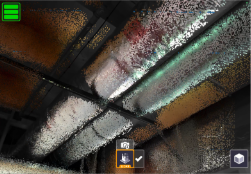
-
Yellow - when GNSS is degraded or you have travelled away from a Marker
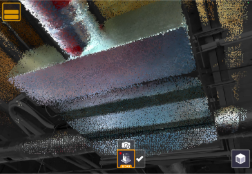
-
Red - indicates a low level of confidence in your current position, return to good GNSS coverage or check in to a Marker as soon as you can
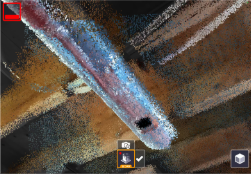
NOTE – For best results, where possible return to Green status prior to ending a scan, either by returning to good GNSS or scanning a Marker.
-
-
New visualization options while scanning:
-
3D - displays the collected points over the standard camera view
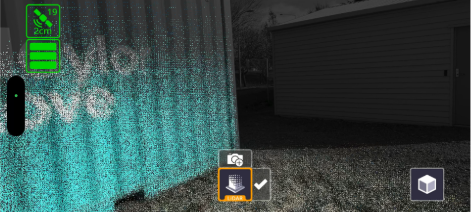
-
Orbit - provides a wider field of view helpful in confined spaces
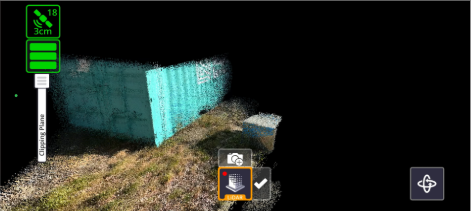
-
Plan - shows a top down view during collection
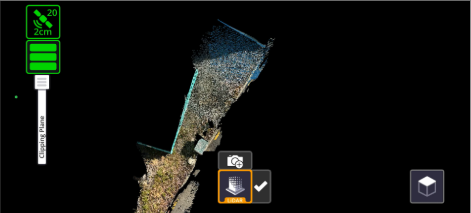
-
-
New on-device scan post-processing step that further refines and improves scan quality. This step will run immediately after completing a scan and allows for in-field review of scan results prior to saving the scan.
-
Scan capture range has been fixed at 6m, and is no longer adjustable - this change was made as part of the overall quality improvements.
Project Workflow Improvements
SiteVision has evolved to support Project based rather than individual Model based workflows. This allows teams to standardize on a common coordinate system or site calibration, and enables data collection & reality capture workflows without requiring a 3D model to get started.
-
You can now create a new Trimble Connect project in the field (online only)
-
You can also set a Trimble Connect project coordinate reference system (CRS) in the field (project admin only, and there must be no existing CRS set)
NOTE – Manually defined folder-specific or model-specific calibration files (JXL/CAL/DC) can still be utilised and will take precedence over a project CRS. But, in general, users are encouraged to move away from individual calibration files and standardize on the project CRS which is far more convenient.
-
Load a Trimble Connect project and collect data without requiring a 3D model
-
Updates to the Quick Access screen to organize local files by project and allow for quick loading of different projects
-
All collected data is now uploaded to a central SiteVision Data folder located in the root of the Trimble Connect project
-
The Measured Placement workflow can be saved for the entire project for all models and users (project admin only).
GNSS & Configuration Updates
This release features a greatly improved new user setup experience. In addition the GNSS configuration has been simplified, automating some of the more advanced features to better support first time GNSS users.
-
New hardware and system configuration wizard. This steps a new user through all of the necessary configuration steps and includes a new graphical interface to support hardware configuration for SiteVision Pro users.
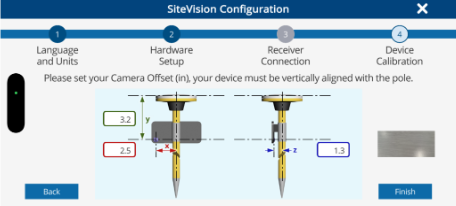
-
The Target Reference Frame setting has been renamed to GNSS Output and is now automatically set based on the active coordinate reference system. This setting is also now locked by default, but can be unlocked in the Advanced Settings dialog. This will allow for alternative output reference frames to be selected if necessary.
-
GNSS engine updates to support the latest reference frames including Time Dependent Datum Transformations and a number of previously unsupported regional reference frames.
Application Features
-
Measurements (points/lines/areas/volumes) are now also saved in TRB format, which allows them to be viewed in Trimble Connect (or in SiteVision)
-
Improvements to point naming logic to correctly increment point names. For example after measuring a point and naming it Tree3, it will now increment to Tree4 (rather than Tree3-1)
-
Mini-apps now feature in-app help that explains what they are used for
-
Mini-apps can now be enabled/disabled from the central carousel menu. Tap the ? icon to manage this. Certain mini-apps are disabled by default for new user installs and will need to be re-enabled before you can use them.
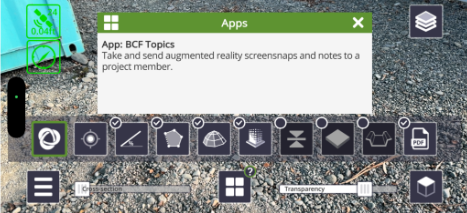
-
The current position (NEE) can be viewed in the Satellite info dialog
-
Added support to load and view .SVD and .SVL model files
-
Added support for Polish language
-
Additional GNSS accuracy fields PDOP, HDOP and VDOP have been added to the SiteVision measurements CSV file
-
The user guide is no longer embedded within the app and now links to an external website (this will only work while online)
Bug Fixes
-
Improved online/offline detection, some users had experienced being logged out unexpectedly in areas of poor internet connectivity
-
Improved retry logic when syncing BCF Topics, notably BCF Topics containing multiple viewpoints
Retired Features and Hardware
-
The original SiteVision Integrated Positioning System (SIPS) DA1 handle is no longer supported
-
Support for loading TRB models direct from “My Files” has been removed
2025.10
Version 2025.10 of the Trimble® SiteVision™ software is available from February 2025.
Feature Enhancements
This release of Trimble SiteVision includes several enhancements that aim to provide more accurate data, enhance collaboration, and improve project management efficiency, including:
-
Improvements to LiDAR scanning
-
Scan distance slider
-
Automatic tiling of scans within Trimble Reality Capture Platform Service
-
-
Extended BCF Topics functionality
-
BCF Topics can be viewed and navigated to in AR & plan view
-
Edit BCF Topics in the field
-
-
Updated measurement tools
-
Depth based volume calculation
-
New toggle option in Lines and Areas app to switch between polyline/polygon measurements
-
In-app help
-
