Measuring the pole height
For accurate GNSS measurements it is important to correctly configure the Pole Height setting.
 Using SiteVision mounted on a survey pole or extension rod
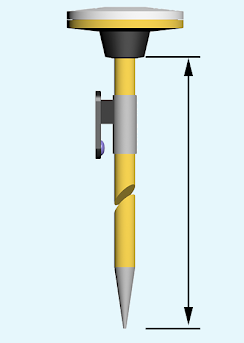 Enter the height measurement from the tip of the pole to the bottom of the Catalyst receiver, as in the image at right. The correction for the offset from the bottom of the pole mount adaptor to the antenna phase center (the point where the GNSS measurement is made) is automatically applied.
Using SiteVision with the handheld HPS2 handle or SiteVision Integrated Positioning System
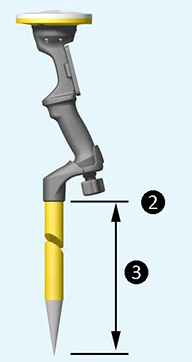
Enter the height measurement from the tip of the pole to the bottom of pole mount, as in the image below. The correction for the offset from the bottom of the pole mount adaptor to the antenna phase center (the point where the GNSS measurement is made) is automatically applied.
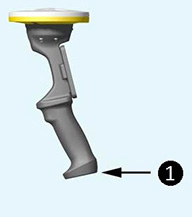
If you are using the HPS2 handle or SiteVision Integrated Positioning system without a pole and place the unit on the ground during measurements, set the pole height to zero and the system will apply the offset for the height of the unit without the pole mount adaptor.
| Standalone
❶ Pole height = 0 (bottom of unit)
|
On Pole
❷ Bottom of Pole Mount Adaptor ❸ Pole Height |