Adjust Polyline with Bowditch
 The Adjust Polyline with Bowditch command allows you to Adjust a 2d polyline/linestring using a Bowditch adjustment.
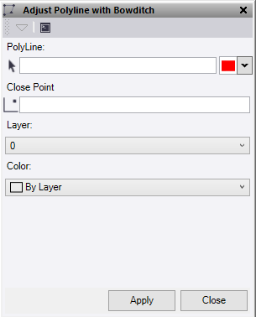
- Click in the Polyline selection field and then in the graphic view to select the line you would like to adjust. Option to change the selection highlight color.
- Click in the Close Point selection field then either input the coordinates or select in the graphic view the point the line should close to, e.g., known station or starting point.
Note: the starting point of the line is fixed and will not be adjusted so the direction of the line should be noted.
- Select a Layer to store the adjusted line on.
- Select a Color for the adjusted line.
- Click Apply, the adjustment preview window should display.
- Set the Maximum Allowable Misclose and Minimum Horizontal Precision Ratio values. If the adjustment exceeds these tolerances a warning window will display when the adjustment is applied.
- Click Apply Adjustment to create the adjusted line and see results.
