Convert to CAD Points
 The Convert to CAD Points command enables you to select points and convert them to CAD points. It attaches user data, such as point id, feature code, descriptions, and feature attributes, to CAD points. This enables you to change data that you do not need global positioning on into light weight CAD points.
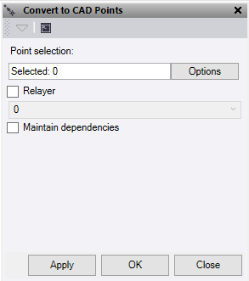
- Click in the Point selection field and then select the points to convert to CAD points in the graphic view.
Click Options for additional selection options.
- Check the Relayer box, then select a layer. Create a new layer to move the new CAD points to a different layer.
- Check the Maintain dependencies box to connect the new CAD points to objects, such as surfaces.
Note: This process takes longer, especially on large data sets.
- Do either of the following:
- Click Apply to apply the changes and keep the Convert to CAD Points window open.
- Click OK to apply the changes and close the Convert to CAD Points window.
The points are now CAD points. They still retain point id, feature code, description, and feature attribute information.
Note: As CAD points are lightweight and simple, things like photos, vector information, and other data not mentioned above will be lost during this conversion.
