Convert to Horizontal Linestring
 The Convert to Horizontal Linestring command enables you to convert linestrings containing vertical data to horizontal data only, by linearising curves using a chord to arc tolerance. It will also add the calculated height at "?" values to the linestring.
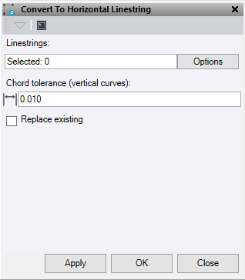
- Click in the Linestring selection field and then in a graphic view to select the linestring to convert.
- Enter the Chord tolerance.
- Optionally, check the Replace existing box to replace the original linestring.
- Do one of the following:
- Click Apply to apply the changes and keep the Convert to Horizontal Linestring command pane open.
- Click OK to apply the changes and close the Convert to Horizontal Linestring command pane.
The linestring now only has data on its horizontal tab.
Note: This command only works on linestrings.
