Convert to Linestring
 Convert to Linestring enables you to convert alignments, polylines, and CAD line objects into Linestring objects. Additionally, it enables you to remove UCS (User Defined Coordinate Systems) from imported CAD objects or from objects created using the Cutting Plane View in TBC.
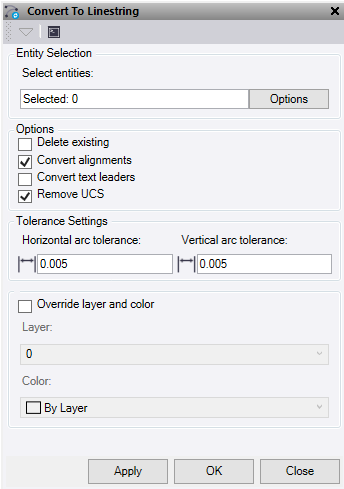
- Click in the Entity selection field and then in a graphic view select the data you want to convert. Click Options button for additional selection options.
- Optionally, check the Delete existing box to delete the source lines once they have been converted into TBC linestrings. Any lines not converted will be left.
- Optionally, check the Convert alignment box to convert any selected alignments to linestrings.
Note: Arcs, vertical arcs, and symmetrical vertical curves in the source alignment can be matched to a linestring. However, spirals and asymmetrical vertical curves do not match with linestring object properties and therefore require chording to approximate. Similarly, linestrings do not have a Chainage, Chainage Equation, or Superelevation property, so those elements are lost on conversion.
- Optionally, check the Convert text leaders box to convert any text leader line selected to a linestring.
- Optionally, check, Remove UCS to remove UCS (User Defined Coordinate System) from imported CAD linework and TBC linestrings created in a cutting plane.
- Enter a Horizontal arc tolerance. This is the horizontal chord to arc tolerance used when converting UCS data and linearising alignment segments that do not match linestring object properties.
- Enter a Vertical arc Tolerance. This is the vertical chord to arc tolerance used when converting UCS data and linearising alignment segments that do not match linestring object properties.
- Optionally, check one or both of the Override layer and colour boxes.
- Layer – Select or create a new layer for the linestrings to be created on.
- Color – Select a colour for the new linestrings.
- Do one of the following:
- Click Apply to apply the changes and keep the Convert to Linestring command pane open.
- Click OK to apply the changes and close the Convert to Linestring command pane.
