Edit Linestring Elevation
 The Edit Linestring Elevation command enables you to select a linestring, optionally nominate beginning and end chainages, and select one of three modes (none, constant, interpolate) to edit the elevations within that chainage range.
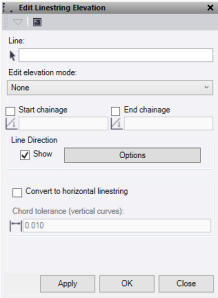
- Click in the Line selection field and then in a graphic view select the linestring which you want to edit.
- Pick an Edit elevation mode from the list.
- None clears any heights within the nominated chainage range.
- Constant allows you to enter an Elevation that will be made constant within the nominated chainage range.
- Interpolate allows you to enter a Start elevation and End elevation which will apply to the nominated chainage range.
- Check the Start chainage box and the End chainage box, and enter the chainage values required.
- The Line Direction - Show check box turns the direction arrows on and off. The Options button is a short cut to the line direction options. Use for ease of direction identification.
- If the linestring contains vertical tab data, check the Convert to horizontal linestring box to convert that data.
- Click Apply to apply the changes and keep the Edit Linestring Elevation command pane open, or click OK to apply the changes and close the Edit Linestring Elevation command pane.
