Create Chord Lines
 The Create Chord Lines command enables you to select one or more linestrings and set a chord distance to create individual line segments at that length, to be applied in 2D or 3D from the start of the line.
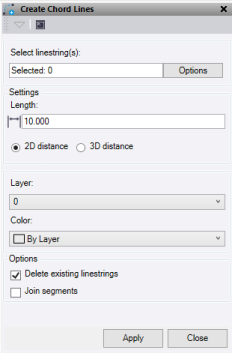
- Click in the Select linestrings selection field and then in a graphic view select the 3d objects. Click Options for additional selection options.
- Enter a chord Length.
- Use the 2D distance mode to apply the length in 2D only.
- Use the 3D distance mode to apply the length in 3D.
- Select an existing Layer or create a new one for the chorded lines.
- Select a Color for the new lines.
- Select Delete existing linestrings to delete the original linestrings used.
- Select Join segments to join all the individual chords into one line.
- Click Apply to create the chord lines and keep the Create Chord Line command pane open, or click Close to close the Create Chord Line command pane.
Note: Only linestrings work with this command.
