Explode Lines
 The Explode Linescommand enables you to explode any linework into ether all segment elements or segments based on user defined deflection angle.
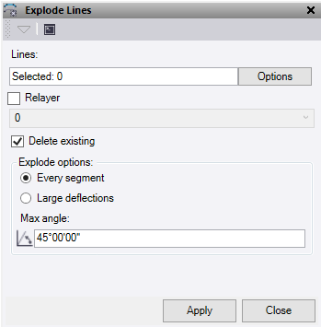
- Click in Lines to explodeselection field, then in a graphic view select the data you want to explode. Click Options button for additional selection options.
- Check the Relayer box to relayer the exploded segments onto a new layer.
- Check Delete existing to delete the source lines after exploding.
- Under Explode options, select Every segment to explode the selected lines into a separate line for every segment of the line.
- Under Explode options, select Large deflections to explode the selected lines where there are large deflections in the line as defined by the max angle set.
- Enter a Max angle, which is the difference between the angle of the inbound and outbound line segments at a node.
- Click Apply to explode the lines and keep the Explode Lines command pane open, or click Close to end and close the Explode Lines command pane.
Note: This command is licenced to Survey Intermediate and above and does not require an ANZ Toolbox licence.
