Extend Lines to Surface
 The Extend Lines to Surfacecommand enables you to select one or multiple lines and extend them on grade to intersect a surface, extend to a set Elevation, or extend by a slope distance.
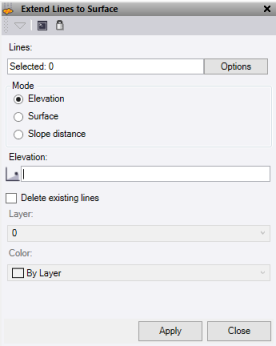
- Click in the Lines field, then in a graphic view select the lines required. Click Options for additional selection options.
- Select a Mode to extend the lines.
- Enter an Elevation to extend to.
- Select a Surface to extend to.
- Enter a Slope distance to extend the line. It extends the last segment of the line.
- Check the Delete existing lines box to create new lines using the layer and color options and remove the old ones. If unchecked the original lines will just be extended.
- Select a layer or create a new one.
- Select a color.
- Click Apply to extend the lines or click Close to end the command.
Note: This command only works on Linestrings.
