Find and Replace Text
 TheFind and Replace Text command allows you to perform a simple search and replace of text objects and add a prefix or suffix to existing text.
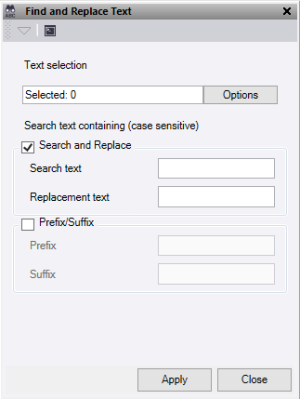
- Click in the Text selection field, then in a graphic view select the data you want to search. Click Options for additional selection options.
- To Search and Replace:
- Enter text in the Search text field. This search acts as a wildcard, finding all text objects that contain that text.
- Enter characters in the Replacement text field to substitute the characters found with the search.
- To add a Prefix/Suffix:
- Enter characters in the Prefix field to add to the start of all selected text objects.
- Enter characters in the Suffix field to add to the end of all selected text objects.
Note: If both Search and Replace and Prefix/Suffix are checked, the search and replace operation happens first.
- Click Apply to perform the operation and keep the Find and Replace Text command pane open, or click Close to end and close the Find and Replace Text command pane.
