Insert/Delete Nodes
 The Insert/Delete Nodes command enables you to adjust linestring geometry by inserting and deleting nodes at defined locations.
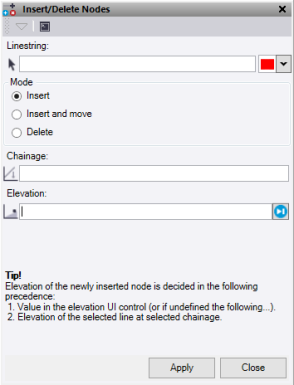
- Click in the Linestring selection field, then in a graphic view select the linestring to edit. Optionally, change the highlight Color.
- Select a Mode:
- Insert places a new node on the line between the current nodes where the chainage is selected.
Enter an Elevation. If the Elevation is undefined, it interpolates the height from the line at the selected Chainage.
- Insert and move allows the user to select a location on the line to insert a new node, and then select a Position off the line to move the node. If you select a current node as your Chainage insert location, it moves that node to the new location.
Enter an Elevation. If the Elevation is undefined, it interpolates the height from the line at the selected location.
- Delete removes the closest horizontal node to the Chainage selected on the line.
- Insert places a new node on the line between the current nodes where the chainage is selected.
- In the Chainage field, enter or select a chainage.
- ClickApply.
Note: This command only works on Linestrings. If the linestring contains VPIs, convert it to horizontal only so the Convert to Horizontal Linestring delete mode works on it.
