Insert Vertices from Points
 The Insert Vertices from Points command enables you to select a line and some points to create new vertices (and optionally, points) from points. Depending on the mode selected, the new nodes are created on the line perpendicular to the selected points, or the line is moved to the selected points.
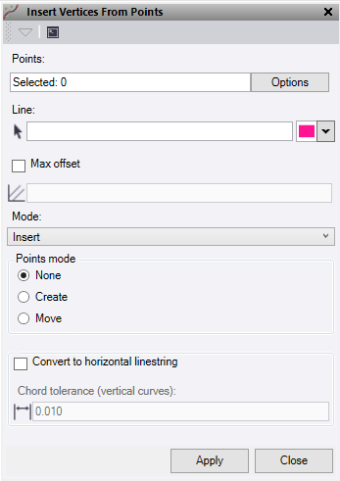
- Click in the Points field, then in a graphic view to select the points to use to create the new nodes on a line. Click Options for additional selection options.
- Click in the Line field, then in a graphic view to select the line to add the nodes to. Optionally, to change the highlight Color.
- Check Max offset to limit the search area from the line.
- Select the Mode to use:
- Insert creates new nodes on the line perpendicular to the points selected without moving the line position.
- Move creates new nodes on the line by moving the line onto the points selected.
- If using the Insert mode, choose one option:
- None inserts new nodes on the line.
- Create creates new points on each new node on the line.
- Move moves the original points onto each new node on the line.
- If the linestring contains vertical tab data, check the Convert to horizontal linestring box to convert that data.
- Click Apply to apply the changes and keep the Insert Vertices From Points command pane open, or Close to close the command pane.
Note: This command only works on linestrings.
