Line Node Cleanup
 The Line Node Cleanup command enables you to clean up duplicate nodes on a linestring, adjust vertical segments, and remove node heights outside the set range.
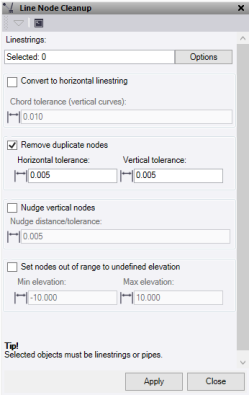
- Click in the Linestrings field, then in a graphic view select the linestrings you want to clean up. Click Options for additional selection options.
- Check the required fields of Convert to horizontal linestring and/or Remove duplicate nodes and/or Nudge vertical nodes and/or Set nodes out of range to undefined elevation.
- If the linestring contains vertical tab data, click Convert to horizontal linestring to convert it to a horizontal linestring.
- Check Remove duplicate nodes and enter the horizontal and vertical tolerance to search for in the linestring and delete nodes. It checks the horizontal, then the vertical distance.
- Check Nudge vertical nodes to search the line for vertical segments that have a horizontal change less then as entered value. If it finds one it moves the segment to give it a horizontal change of the entered value.
- Check Set nodes out of range to undefined elevation to search the line for nodes outside of the specified elevation range. If a node is found to be outside the elevation range, the elevation is set to undefined.
- Click Apply to apply the changes and keep the Line Node Cleanup command pane open.
Note: This command only works on Linestrings.
