Map and Export
 The Map and Export command enables you to use a Layermap file created with the Map Objects command, and export data directly to a file without needing it to go into TBC first. This allows for data structure changes for deliverables to third parties without changing the integrity of your TBCproject.
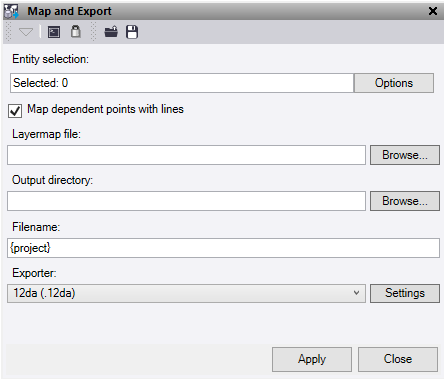
Use the Load and Save buttons at the top of the command pane there is the ability to load and save a settings file. Once you have populated the command with the appropriate settings you can save it in a file that can be reloaded in the future.
- Click in the Entity selection field, then in a graphic view select the lines required. Click Options for additional selection options.
- Check Map dependent points with lines to re-layer the linked points that make up a line, if that line is selected during the mapping process. This only effects .vcl file exports.
- Enter the directory path under Layermap file, or use the Browse button to select the Layermap file to map the data against during export.
- Enter the directory path under Output directory, or use the Browse button to select the folder for the files to be written to.
- Enter a Filename. To send the file into a new folder under the main output directory, add it in here. For example, New folder\Filename. Right click in the text box to use the available placeholders.
- Under Exporter, select the required file type to be exported from the list. Click Settings to modify the output options for each export type.
- 12da
- DXF
- DWG
- XML
- IFC
- VCL
- Click Apply to run the map and export and keep the command pane open.
