Match Attribute Values
 The Match Attribute Values command enables you to select a source object containing feature attributes and copy the values to target objects with the same attribute names. It is important to note that the Feature Codes do not need to be the same, and it can be used between points, lines, and polygons. This will not create attributes on target objects that do not already exist.
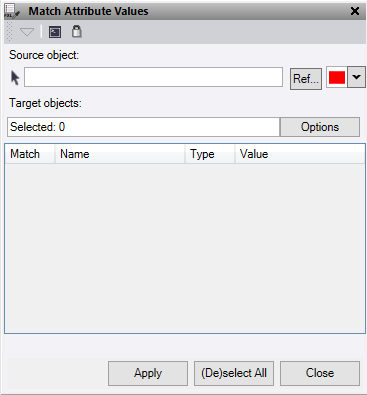
- Click in the Source object field, then in a graphic view select the object to copy feature attribute values from. Optionally, change the selection highlight Color for lines, or click Ref to select a reference file..
- Click in the Target objects field and then in a graphic view select the data you want to match the attribute values onto. Click Options button for additional selection options.
- You can de-select any of the specific attributes you do not want to match in the table.
Note the following when matching attributes:
|
If the target object... |
Results: |
|
Includes existing attributes values. |
The selected source object attribute values replace the target object attribute values completely. |
|
Is a linestring or polygon controlled by feature coded points |
The associated points will have their attribute values changed at the same time as the line. |
- Click Apply to replace the attribute values on the target objects.
- Click Close to end and close the Match Attribute Values command pane.
