Points from Chainage Offset
 The Points from Chainage Offset command enables you to create points using chainage, offset, and elevation along an alignment. You can import a .csv file and define the columns containing the point ID, chainage, offset, elevation, and code.
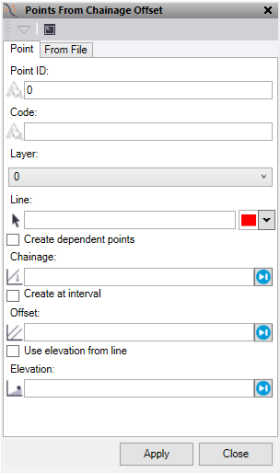
- On the Point tab, enter the Point ID.
- Optionally, enter a feature Code.
- Select a Layer, or select <New layer> to create a new layer.
- Select a Line to control the chainage and offset of the points. This can be an alignment or a linestring. Optionally, change the selection highlight Color.
- Optionally, check Create dependent points.
- Enter a Chainage, or click on the Plan view to select a chainage.
- Optionally, check Create at interval.
- Enter the chainage Interval
- Use a Start and End chainage to limit the point creation.
- Enter an Offset, or click on the Plan view to select an offset.
- Enter an Elevation, or click on the Plan view to adopt an elevation. Alternatively, check Use elevation from line to use the line to determine the point elevation.
- Optionally, add a Vertical offset to the level taken from the line.
- Click Apply to apply the changes and keep the Points from Chainage Offset command pane open, or click OK to apply the changes and close the Points from Chainage Offset command pane.
To use the File tab
- On the File tab, select a CSV file containing chainage and offset data.
- Select a Line to control the input of points. This can be an alignment or a linestring.
- Optionally, check Create dependent points.
- Check Use elevation from line if you need the levels for the points to be taken from the line instead of the CSV file.
- Optionally, add a Vertical offset to the level taken from the line.
- Select a Layer, or select <New layer> to create a new layer.
- Optionally, enter a point ID Prefix if required.
- Choose the column positions as set in the selected CSV file.
- Click Apply to apply the changes and keep the Points from Chainage Offset command pane open, or click OK to apply the changes and close the Points from Chainage Offset command pane.
Note: If points are entered with a chainage beyond the limits of the line/alignment used then the last segment of the line will be extended to locate these.
