Simplify Linestrings
 The Simplify Linestrings command enables you to select one or more lines to remove unnecessary segments from the lines, and convert horizontally chorded linework to curvilinear linestrings. This is ideal for converting segmented road centerlines into true arc geometry so you can make a clean alignment string.
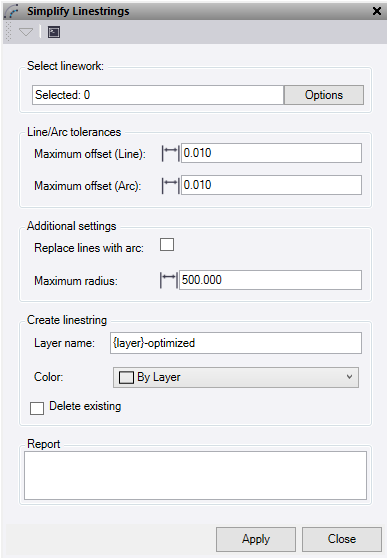
- Click in the Linestrings field, then in a graphic view select the linestrings you want to simplify. Click Options for additional selection options.
- Maximum offset (line) – The straight-line tolerance checks how far points can drift from a straight path before the segment has to stop. The algorithm keeps adding points to the line as long as they stay close enough, measuring the shortest distance from each point to the ideal line. If any point strays too far, it cuts off the segment at the last good point to keep it looking straight.
- Maximum offset (Arc) – The arc tolerance makes sure a curve follows the original shape without bending too much. It tries different arc fits, checking how far the new curve deviates from the original path. If the difference is too big, it either adjusts the arc or switches back to a straight line to keep things accurate.
- Check Replace lines with arcs so the command tries to fit curves to a series of straights chords.
- Enter the largest radius that would be encountered in the selected linework into Maximum radius. This helps determine when nodes should be considered a straight or an arc.
- Enter a suffix for the new Layer name behind the placeholder of either {layer} or {name}. Clicking the right mouse button to insert the placeholder.
- {name} – Use the name of the line selected.
- {layer} – Use the layer name of the line selected.
- Select a Color for the new lines.
- Check Delete existing to delete the original lines being optimised.
- – The Report table displays the original line segment information for each line selected, and the new optimised segment information. The number of lines operated on and the total number of segments removed are displayed at the bottom of the report.
- Click Apply to run and keep the Simplify Linestrings command pane open, or click Close to close the command.
Note: To achieve the best result, it sometimes requires the line to be processed a few times as it will continue to improve the results until nothing further can be done.
