Role configuration
If you have the necessary system privileges you can access the Role Configuration tab where you can edit or create new user roles.
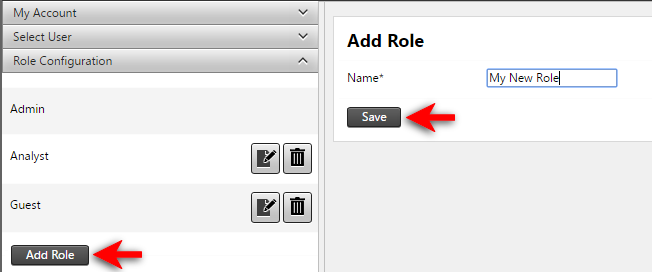
To add a new user role click the Add Role button, enter a unique name for the role and then click Save.
To configure a user role, select the allowable permissions from the list available.
Some permissions are required by others. For example, if the View permission is configurable for a user role then assigning Edit permissions to that role will automatically also assign View permissions.
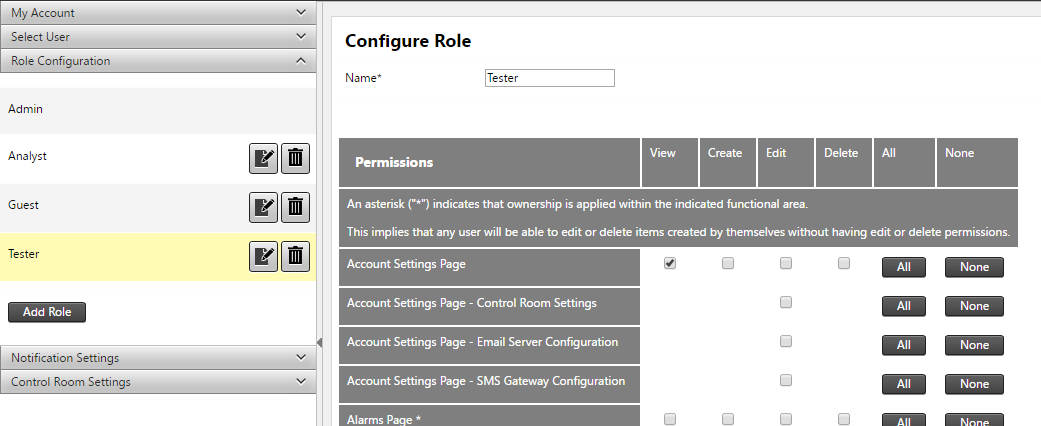
If you change the permissions of a User Role the Save button appears. Click Save to apply your changes to the user role.
Use the Delete icon to delete user roles. You can delete a user role only if the user role is not assigned to any user accounts. You must disassociate the user role from all user accounts before deleting it.
