Battery and power supply
The X12 scanner can be powered with batteries for wireless operation or with direct power supply from a cable.
Operating with the battery packs
To attach the batteries:
-
Push batteries sidewards into the attachments on each side of the scanner until the clips latch.

To remove the battery:
-
Hold the battery and press the fixing clip at the bottom.
-
Pull the battery carefully sidewards out to detach it.
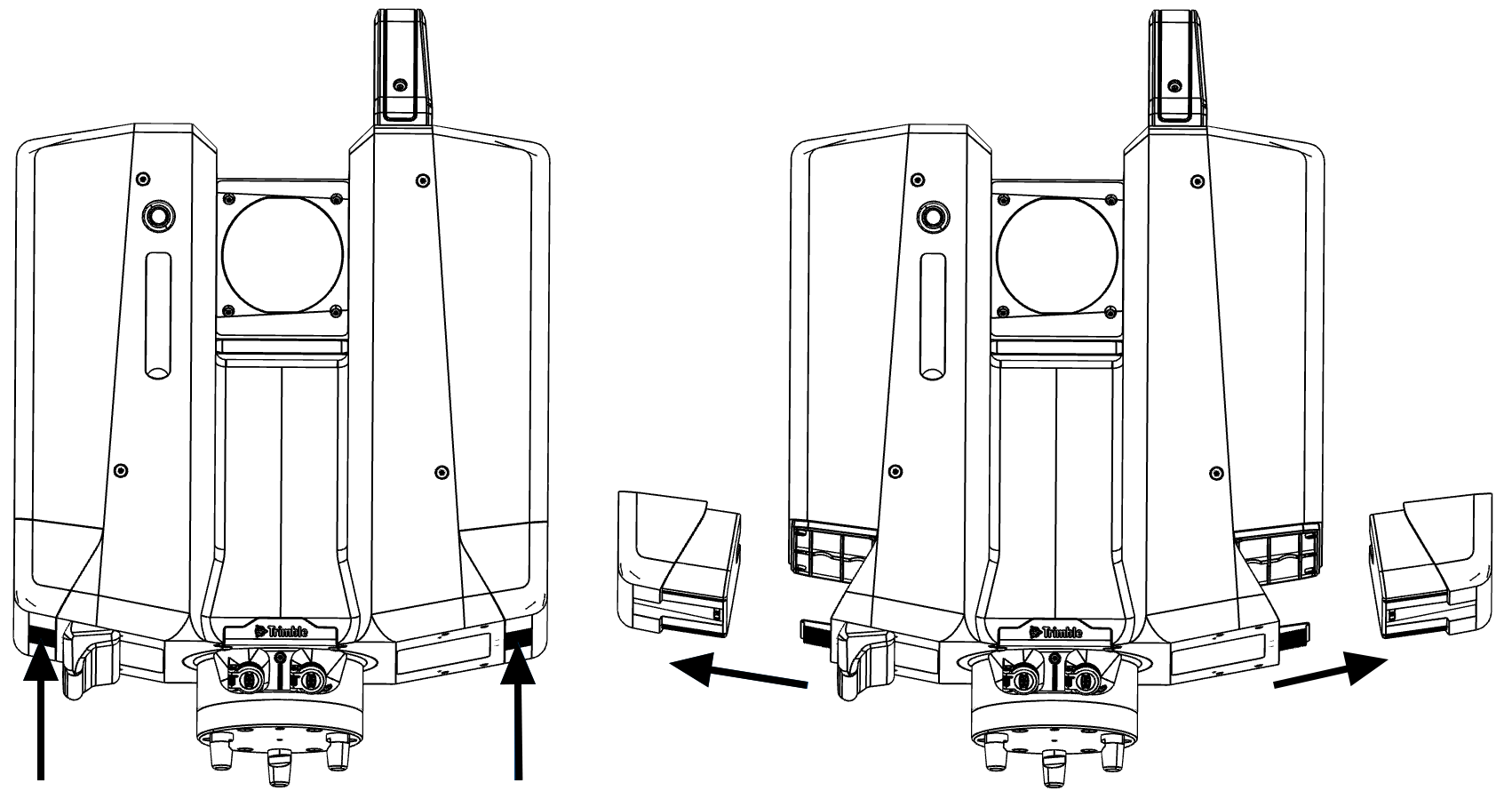
-
Before using the battery for the first time, each of them should be completely charged by the charger.
-
When switching batteries, always leave one battery attached to maintain power to the scanner.
-
Both battery packs can be removed for charging if the external power supply is connected.
-
You can connect the power supply to the scanner to charge both battery packs during operation.
Never remove both battery packs while the scanner is powered on and the power supply is not connected.
Disconnecting the supply voltage while scanning, might result in loss of data and crashing of the system.
If the scanner is operated until the battery is completely empty (total discharge), it has to be recharged immediately. Failure to do this can result in damage to the battery
First usage / recharging the battery:
-
Only use the corresponding charger.
-
Each battery must be charged by the charger prior to the first usage.
-
The permissible temperature range for charging is between 0 °C to +40 °C / +32 °F to +104 °F.
-
It is normal for the battery to become warm during the charging process. If the battery temperature is too high the charging process is aborted.
Both battery packs should always be attached to ensure the optimum weight balance of the scanner. If there is one removable battery not connected, a warning message will appear.
You can charge the attached battery packs in the scanner by connecting the power supply to the scanner, but in general it will be more productive to charge with the charger.
Period of use and life span of the battery
-
The period of use depends on the electrical load, temperature and the age. A battery will last about 2.5 hours.
-
A battery only reaches about 70 % of its capacity after being charged properly, the battery pack is exhausted (usually after about 600 – 800 cycles) and must be replaced. Please contact Trimble support or your distributor for a replacement.
-
If the battery packs will be stored for a long period of time, the charging capacity should not be more than 60 – 70 % (i.e. up to the third diode indicated on the charger).
-
After a longer period of storage, each battery has to be recharged before using it. As soon as the minimum level of the operating voltage of 12 V DC is reached, the battery has to be recharged.
Storing and transporting the battery

-
Never put the battery close or into fire.
-
Never put the battery close to easily inflammable or combustible material.
-
Never short circuit the poles of the battery with cable or tools.
-
The accurate polarity of the battery and the charger must be assured.
-
Never dismantle or convert the rechargeable battery.
-
If the battery breaks and electrolyte gets in contact with skin or clothes, it has to be washed with water immediately. In case of contact with eyes, please consult a physician immediately.
-
The battery has to be protected against use by a non-authorized person.
-
It is not recommended to store a discharged battery (Caution of depth discharge). Storing the battery pack in such a state can damage it permanently.
-
If stored, the battery has to be recharged at least every six months.
-
The storage temperature should be between 0 °C to 30 °C (32 °F to 86 °F) without any direct variations in temperature to extend the durability of the battery as long as possible.
-
The storage location should be dry.
When transporting or shipping batteries, ensure that the applicable national and international rules and regulations are observed. Before transportation or shipping, contact your local passenger or freight transport company.
Operating with the power supply

To operate with the power supply:
-
Connect the power supply cable to the scanner.
-
Connect the power cable to the power supply.
-
Connect the power cable to the main power supply.
-
Power on the scanner.
