Release notes
This section provides all the release notes for the Trimble X7 laser scanner firmware, starting from the version
 Firmware Version 2.7.005
Introduction
Trimble® announces the release of X7 firmware version 2.7.005, available from February 2026. This important update is recommended for all Trimble X7 3D laser scanners to ensure serviceability.
Overview
-
Maintains serviceability with new components for the LED status board
-
Supports correction and filtering of high return signals to prevent artifacts at the wrong distance
-
Maintains Trimble X7 cybersecurity updates
-
Firmware version 2.7.005 cannot be downgraded after installation
After updating the firmware, the yellow LEDs may not turn green during the first boot of the scanner on some units. If the yellow LEDs do not turn green after approximately 1:30 seconds, reboot the scanner a second time. The yellow LEDs should turn green within 1:30 seconds. Boot times will be approximately 20 seconds longer with firmware 2.7.005 due to additional actions during startup.
Requirements
Trimble recommends installing Perspective version 2025.10.2741 or greater to ensure compatibility with firmware version 2.7.005. FieldLink customers should install version 7.1 or greater. FieldLink 7.0 is not compatible with firmware version 2.7.005. Please contact your distribution partner about upgrading to the latest version of FieldLink before upgrading.
Firmware Version 2.5.201
Introduction
Trimble announces the release of firmware version 2.5.201, available from March 2024, for the Trimble X7 3D laser scanner. This firmware update provides general fixes and production improvements. All X7 users should update to this important firmware version.
Overview
-
Fix issue to correct complete area scan colorization
-
Fix issue with scan task never stopping when rare distance calibration error occurs
-
Apply improvements to V-Axis regulation parameters
Requirements
Customers should install Trimble Perspective version 2024.00.2325 to ensure compatibility with firmware versions 2.5.201.
Firmware Version 2.5.12
Introduction
This document announces the release of firmware version 2.5.12, available from November 2022, for the Trimble X7 3D laser scanner.
Requirements
Please make sure you are running Trimble Perspective version 3.1.1 to ensure compatibility and to enable new features.
Overview
-
Support for new Area Scan feature in Trimble Perspective version 3.1.1
-
General enhancements for field calibration and diagnostics
-
Resolve SD Card sync issue
-
Resolve error when enabling images during initialization
Firmware Version 2.5.100
Introduction
Trimble announces the release of firmware version 2.5.100, available from February 2023, for the Trimble X7 3D laser scanner. This firmware update is for production purposes only. Production will install 2.5.100 on new instruments and no action is required if a customer receives an instrument with this firmware version.
Overview
-
General changes for production line to support new board versions
Firmware 2.5.12 vs 2.5.100
All features of the current released version of firmware 2.5.12 are included in version 2.5.100. Trimble Installation Manager (TIM) will prohibit the installation of earlier firmware versions on instruments running 2.5.100. The following message will appear. Firmware 2.5.100 will update later when newer versions become available on TIM.
 The selected firmware package R2.5.12 is below the required minimal version R2.5.100. The installation is rejected.
Customers running firmware 2.5.12 are not required to update. Customers running firmware versions older than 2.5.12 are encouraged to update.
Requirements
Customers should install Trimble Perspective version 3.1.1 to ensure compatibility with firmware versions 2.5.12 and 2.5.100.
Firmware Version 2.4.23
Introduction
This document announces the release of firmware version 2.4.23, available from April 2022, for the Trimble X7 3D laser scanner. The firmware update implements a new password requirement for Wi-Fi security and corrects an issue with movement detection and leveling after running diagnostics or calibration reports.
Requirements
This update requires Trimble Perspective version 2.1.5.1512 on the tablet connecting to the Trimble X7. Trimble Perspective Mobile users will also need to update the TPM app from the Apple or Google Play Store.
Setting new password for Wi-Fi connection
-
Upgrade to firmware 2.4.23 and start Trimble Perspective version 2.1.5.1512
-
Tap the instrument icon in red to open the Connections page.
-
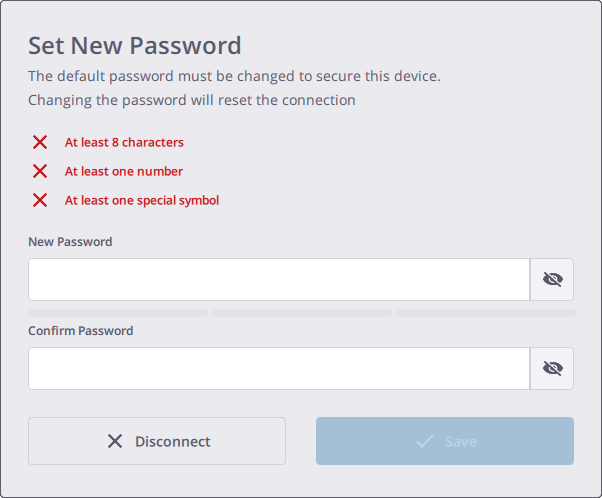
Choose the Wi-Fi connection type and Trimble Perspective will prompt you to set a new Wi-Fi password to secure the device.
-
The new Wi-Fi password should contain only ASCII characters. It must be at least eight characters long and contain at least one number and one special symbol.
-
Tap Save to set the Wi-Fi password to the instrument. The next time you reconnect to the instrument with the same tablet, the connection is automatic and does not require the Wi-Fi password to be entered.
-
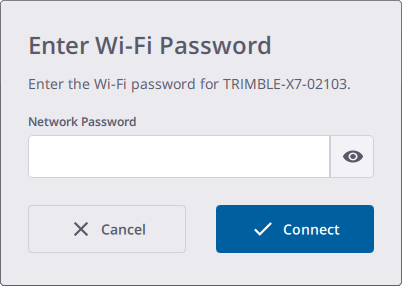
If you connect to the instrument from a different tablet, the Perspective software prompts you to enter the Wi-Fi password that is saved to the instrument.
-
If you forgot the password you can reset the password to the factory default value by pressing the On/Off button on the instrument for twenty seconds. You will hear beep, followed by three consecutive beeps after ten seconds and then five consecutive beeps after ten more seconds. Release the On/Off button to complete the reset. Perspective will prompt you to set the password again the next time you try to connect to the instrument.
Password for Trimble Perspective Mobile
Users running Trimble Perspective Mobile on iOS and Android mobile phones will have to input the same password that has been assigned via Trimble Perspective software running on a tablet. Passwords are assigned to the X7 instrument and will be required to be entered from all devices connecting to them.
Passwords assigned to specific X7 instruments should be shared with all users that need access to the instrument from any tablet or phone.
Firmware Version 2.4.209
Introduction
This document announces the release of firmware version 2.4.209, available from October 2022, for the Trimble X7 3D laser scanner.
Requirements
Please make sure you are running Trimble Perspective version 3.0.1.1698 to ensure compatibility with Trimble X7 firmware version 2.4.209.
Overview
-
Corrected issue with movement detection when scanning upside down
Firmware Version 2.4.102
Introduction
This document announces the release of firmware version 2.4.102, available from June 2022, for the Trimble X7 3D laser scanner. The firmware update corrects a rare issue found with firmware version 2.4.23 where some password strings failed. Below are the instructions for setting a new Wi-Fi password.
Requirements
This update requires Trimble Perspective version 2.1.5.1515 on the tablet connecting to the Trimble X7. Trimble Perspective Mobile users will also need to update the TPM app from the Apple or Google Play Store.
Setting new password for Wi-Fi connection
-
Upgrade to firmware 2.4.102 and start Trimble Perspective version 2.1.5.1515
-
Tap the instrument icon in red to open the Connections page.
-
Choose the Wi-Fi connection type and Trimble Perspective will prompt you to set a new Wi-Fi password to secure the device.
-
The new Wi-Fi password should contain only ASCII characters. It must be at least eight characters long and contain at least one number and one special symbol.
-
Tap Save to set the Wi-Fi password to the instrument. The next time you reconnect to the instrument with the same tablet, the connection is automatic and does not require the Wi-Fi password to be entered.
-
If you connect to the instrument from a different tablet, the Perspective software prompts you to enter the Wi-Fi password that is saved to the instrument.
-
If you forgot the password you can reset the password to the factory default value by pressing the On/Off button on the instrument for twenty seconds. You will hear beep, followed by three consecutive beeps after ten seconds and then five consecutive beeps after ten more seconds. Release the On/Off button to complete the reset. Perspective will prompt you to set the password again the next time you try to connect to the instrument.
Password for Trimble Perspective Mobile
Users running Trimble Perspective Mobile on iOS and Android mobile phones will have to input the same password that has been assigned via Trimble Perspective software running on a tablet. Passwords are assigned to the X7 instrument and will be required to be entered from all devices connecting to them.
Passwords assigned to specific X7 instruments should be shared with all users that need access to the instrument from any tablet or phone.
Firmware Version 2.3.22
Introduction
This document announces the release of firmware version 2.3.22, available from September 2021, for the Trimble X7 3D laser scanner. The firmware update includes new enhancements, general updates and bug fixes.
Overview
-
New indoor high productivity scan mode. Requires the new Trimble Perspective 2.1.3.1474.
-
Option can be enabled in Trimble Perspective, General Settings
-
Increases productivity with reduced scan acquisition times
-
For use in stable indoor environments where short range scans are sufficient
-
-
Improved image collection and save time
-
Corrected issue with completion of image acquisition with upside down setup
-
General improvements to laser pointer behavior
-
Enhanced onboard diagnostics for instrument components
-
Enhanced course tilt measurements
-
Fixed intermittent issue with level status resetting to unknown after scan
-
General improvements to thermal check
-
General improvements to Wi-Fi communication
-
Fixed SD Card file error after stopping scan
-
Fixed diagnostics IMU heading measurement failure
-
Corrected issue with Perspective reading projects created with Perspective Mobile app.
Firmware Version 2.2.103
Introduction
This document announces the release of firmware version 2.2.103, available from May2021, for the Trimble X7 3D laser scanner. The firmware update addresses shutdown issues reported with firmware 2.2.42 and other general updates and bug fixes.
Overview
-
Fixed issue in firmware 2.2.42 with instrument push button shutdown
-
Fixed intermittent issue with power LED blinking after shutdown
-
Fixed issue with automatic shutdown after firmware update
When updating from build 2.2.42 to 2.2.103, the tool will show the following message after successful firmware update in case the instrument doesn’t shutdown properly.
In the rare case the instrument is not completely shutting down after the firmware has been updated: Please release the battery compartment.
-
Fixed intermittent issue with scan not starting or finishing
-
Japan WiFi now resets automatically to 2.4 GHz
-
Corrected rare issue requiring remote updates to reinitialize the scanner running FW version R2.2.42
Firmware Version 2.1.205
Introduction
This document announces the release of firmware version 2.1.205, available from January 2021, for the Trimble X7 3D laser scanner. The firmware update has general improvements and bug fixes recommended for all users.
Overview of update
-
Firmware update tool will shutdown the instrument to avoid communication problems
-
Improved IMU information
-
Field Calibration report will work for upside down setups
-
Other minor bug fixes
-
General improvements for production
Firmware Version 2.1.100
Introduction
This document announces the release of firmware version 2.1.100, available from January 2021, for the Trimble X7 3D laser scanner. The firmware update is for general improvements for production purposes only. Some users may receive instruments with R2.1.100 firmware already installed and should not downgrade to older versions of firmware. Instruments currently running R2.1.11 do not need to be updated to R2.1.100.
Overview
-
General improvements for production
Firmware Version 1.1.506
Introduction
This document announces the release of firmware version 1.1.506, available from September 2020, for the Trimble X7 3D laser scanner. The firmware update is for general calibration improvements for production purposes only. It is not necessary to update if you are currently running version 1.1.401.
Overview
-
Calibration improvements for production
Firmware Version 1.1.401
Introduction
This document announces the release of firmware version 1.1.401, available from May 2020, for the Trimble X7 3D laser scanner. The firmware update is recommended for general data quality improvements.
Overview
-
Enhanced angular and distance accuracy
Firmware Version 1.1.303
Introduction
This document announces the release of firmware version 1.1.303, available from March 2020, for the Trimble X7 3D laser scanner. The firmware update is recommended for general data quality improvements.
Overview
-
Enhanced data quality at close range on flat surfaces like walls and ceilings
Firmware Version 1.1.206
Introduction
This document announces the release of firmware version 1.1.206, available from February 2020, for the Trimble X7 3D laser scanner. The firmware update is recommended to improve both performance and robustness of the distance auto-calibration for low luminance signals.
Overview
-
Enhanced distance calibration threshold
-
Enhanced albedo calibration for low luminance
Firmware Version 1.1.110
Introduction
This document announces the release of firmware version 1.1.110, available from January 2020, for the Trimble X7 3D laser scanner. The firmware provides general improvements and bug fixes.
Overview of update
-
System calibration enhancements
-
IMU enhancements
-
Improved laser pointer function for Trimble Field Link
-
Minor bug fixes
Trimble X7 and Perspective Software Release 2.0
Introduction
Trimble announces Release 2.0 for the Trimble X7 3D Laser Scanning System. This release includes several new features with updates to Trimble X7 firmware version 2.1.11 and Trimble Perspective software version 2.0.1.1336.
See the summary below of the new features and enhancements.
Trimble X7 Firmware and Perspective Software Update
Trimble X7 firmware version 2.1.11 and Trimble Perspective software version 2.0.1.1336 are available through the Trimble Installation Manager. Users must update both the instrument firmware and controller software to enable the following new features and enhancements. The Perspective software will prohibit connection to X7 instruments running firmware older than version 2.1.11.
Summary
-
Georeferencing
-
X7 laser pointer to locate points for Perspective Precision Point measurement and georeferencing
-
Manually input coordinates or import survey control files to assign georeference points to link registered scans to project coordinate systems
-
-
HDR (High Dynamic Range) Imaging
-
New option to capture HDR images with 3 exposures
-
Enables higher range of luminance for more color and detail in bright and dark areas
-
-
LED on/off option
-
New option to turn off LEDs when required for specific applications, e.g., railway projects
-
-
Increased tilt range
-
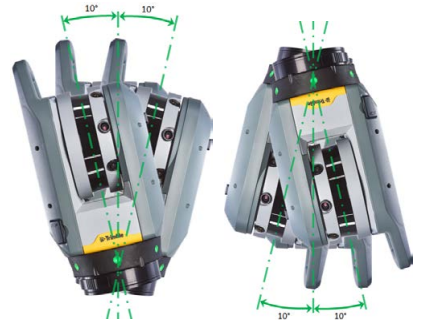
Increased tilt range from ±5° to ±10° for survey grade accuracy of <3” for upright and upside down scans.
-
-
LED Leveling Guide on/off option
-
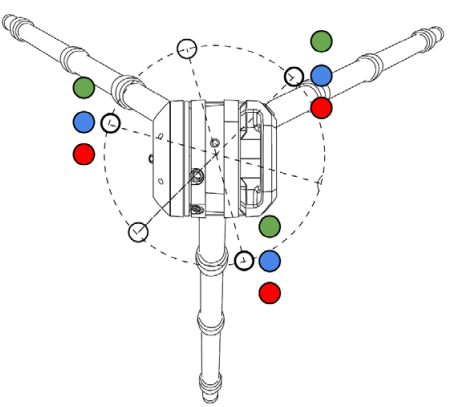
New Leveling Guide to assist with the adjustment of tripod legs to ensure instrument is leveled within range of ±10°
Green Solid - Leveled within range of ±10°
Green Flashing - tripod leg near the LED does not need to be adjusted
Blue Flashing - tripod leg near the LED is too low and should be raised
Red Flashing - tripod leg near the LED is too high and should be lowered
-
-
Project management improvements.
-
Change project names
-
Merge projects
-
Delete projects and scans from the SD Card
-
New default coordinates display for NEEl
-
NEEl or XYZ coordinate options for registration report
-
-
New Sound Notifications
-
Short beep for successful Precision Point measurement
-
Two short beeps for failed Precision Point measurement
-
-
Processing improvements
-
Registration refinement
-
Image colorization and matching
-
Option to Unlock Station Leveling during Refine
-
-
New Diagnostics Report
-
Report to summarize the status of Trimble X7 system components.
-
-
New Field Calibration Report
-
Report to summarize calibration results when required for specific projects e.g., Forensics for court documentation.
-
For more information, contact your local Trimble Distribution Partner.
