Joystick Switches and Remote Switch on Cat NGH mini/micro machines
Depending on your installation, the Autos switch can be configured via:
- The factory standard joystick
-
Certain third party joysticks
NOTE – Ask your technician which switch has been configured for Autos.
Factory Standard Joystick Switch
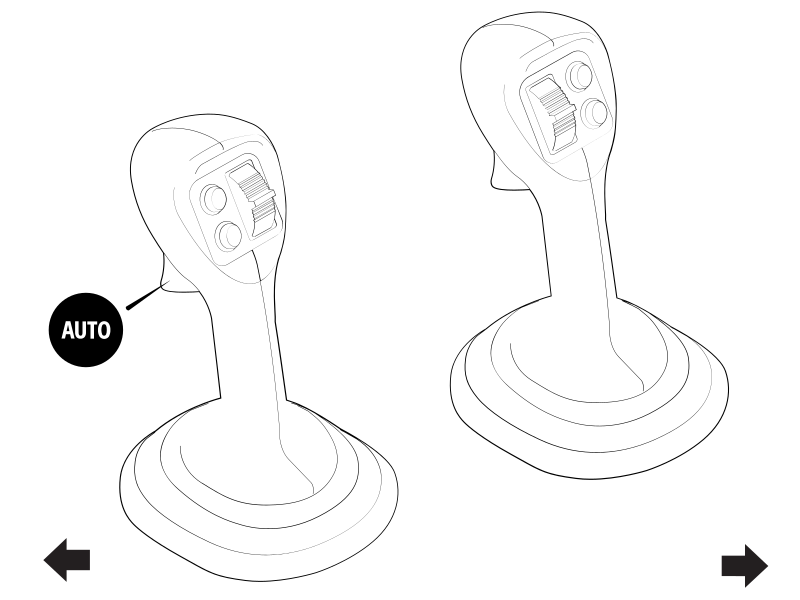
The integrated Grade Auto switch on your left joystick allows you to engage Depth and/or Tilt Autos.
Remote Switch
CAUTION – Avoid installing the remote switch on a Cat NGH mini/micro excavator with the factory standard joysticks. The weight of the module can cause the joystick to tip, which can lead to unintended machine movement.
The remote switch lets you use common features while keeping your hands close to the machine controls. The remote switch only functions when you are in the work screen. The functionality of the remote switch depends on the mode you are in.
Depth and Slope mode functionality
For Depth and Slope mode, the remote switch lets you:
-
Select the attachment focus (4)
Each button press will cycle the attachment focus from Left to Right
- Increase (1) or decrease (2) the elevation offset
- Bench elevation (3)
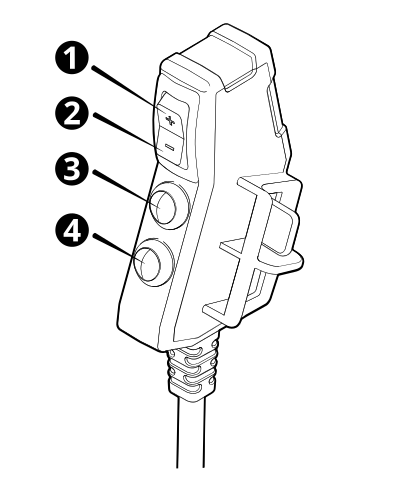
| 1 | Increment elevation offset switch | 2 | Decrement elevation offset switch | 3 | Bench elevation switch |
| 4 | Attachment focus switch |
Design mode functionality
For Design mode, the remote switch lets you:
-
Select the attachment focus (4)
Each button press will cycle the attachment focus from Left to Right
- Increase (1) or decrease (2) the elevation offset
- Record point (3)
| 1 | Increment elevation offset switch | 2 | Decrement elevation offset switch | 3 | Record point switch |
| 4 | Attachment focus switch |
