Bench Heading
In Depth and Slope mode, if you have GNSS or a heading sensor, you must bench the heading before you begin working.
Benching the heading sets the direction of the design mainfall. The system calculates target slopes from the benched direction even during machine rotation. You can use the current direction of the machine to bench, or if you have GNSS receivers, choose two points on the ground.
TIP – Using the Two Point Method is more accurate as it defines the direction of the bench heading.
NOTE – If you have 3D sensors, in the Bench Heading screen, the Current Heading displays relative to grid north. However, if you have a heading sensor it displays relative to magnetic north.
One point method
You can access the Bench Heading screen via the Work Settings menu or the shortcut bar.
- Position the machine in the direction of the design mainfall.
-
Tap the Bench Heading icon

This clears the current bench and sets a new bench heading along the line of the linkage.
Alternatively:
- Touch and hold the Bench Heading icon
- Tap Bench.
Two point method
If you have GNSS receivers, use the two point method to bench the heading as this method is more accurate than the one point method.
You can access the Bench Heading screen via the Work Settings menu or the shortcut bar.
- Position the machine in the direction of the design mainfall.
- Touch and hold the Bench Heading icon
- Toggle the Two‑Point Method on.
- Follow the wizard to select two points:
-
Touch the
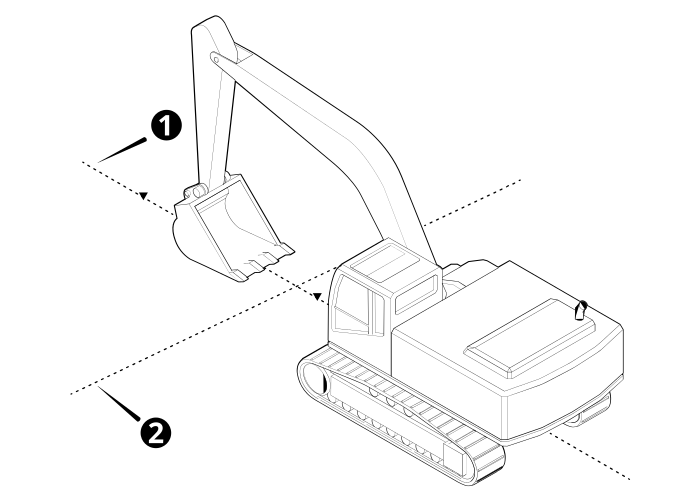
1 Mainfall 2 Cross slope - Make sure that the only machine movement between point one and two is from the stick and boom (no slew).
- Tap Bench.
When to re‑bench your heading
If you only have a single GNSS receiver, you must re‑bench your heading whenever you move the machine tracks.
If you have 2D as the positioning source and a Cat rotation sensor or HS410 heading sensor, you must re-bench your heading whenever you move the machine tracks off the benched alignment.
Useful text items
Text items display information on the work screen. When you bench the heading the following text item can be helpful: Rotation.
Troubleshooting
The table below lists some of the error messages that may appear when you use the two point method to bench the heading.
| Error Message | Action |
|---|---|
| Too much movement |
Machine movement between point one and two should only be through the stick and boom (i.e. no slew). |
| Point 2 not saved, bench points are too close | Select a second point that is further away from point one. There should be at least one meter between the two points. |
