Remote Switch
NOTE – You cannot configure the remote switch.
The remote switch lets you use common features while keeping your hands close to the machine controls. The remote switch only functions when you are in the work screen. The functionality of the remote switch depends on the mode you are in.
For Depth and Slope mode, the remote switch lets you:
-
Select the attachment focus
Each button press will cycle the attachment focus from Left to Right
- Increase or decrease the elevation offset
- Bench elevation
-
Confirm and engage Depth Autos (depth auto switch)
For Design mode, the remote switch lets you:
-
Select the attachment focus
Each button press will cycle the attachment focus from Left to Right
- Increase or decrease the elevation offset
- Record point
-
Confirm and engage Autos (auto switch)
NOTE – For tiltrotators, this only controls Depth Autos. Use the tilt auto switch as per your tiltrotator manufacturer instructions. For tilting buckets and tilting hitches this controls both Depth and Tilt Autos.
Depth and Slope mode functionality
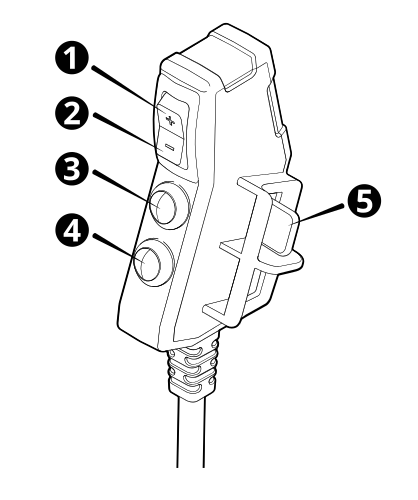
| 1 | Increment elevation offset switch | 2 | Decrement elevation offset switch | 3 | Bench elevation switch |
| 4 | Attachment focus switch | 5 | Confirm and engage Depth Autos (depth auto switch) |
Design mode functionality
| 1 | Increment elevation offset switch | 2 | Decrement elevation offset switch | 3 | Record point switch |
| 4 | Attachment focus switch | 5 | Confirm and engage Autos (auto switch) |
