ATI Switches on Compact Track Loader Machines
The ATI LevelBest grader and box blades can be used with supported compact track loader machines.
For the ATI LevelBest grader you can use either:
For the ATI PD-series box blade you can use either compatible compact track loader joysticks or:
ATI JS1-HR1 grader joystick for grader blade attachments
You can use certain switches on the joysticks to perform common tasks while keeping your hands close to the machine controls. The joystick switches only function when you are in the work screen.
The joystick switches shown in the image below let you:
-
Engage Autos.
Each press of the auto switch (1) cycles between Auto and Manual (combined left and right autos).
-
Increase or decrease the elevation offset or the target cross slope using the increment (3) and decrement (2) switches.
Depth and Slope mode or Design mode Operator + Cross Slope sensor combination Increase or decrease the elevation offset. Increase or decrease the target cross slope.
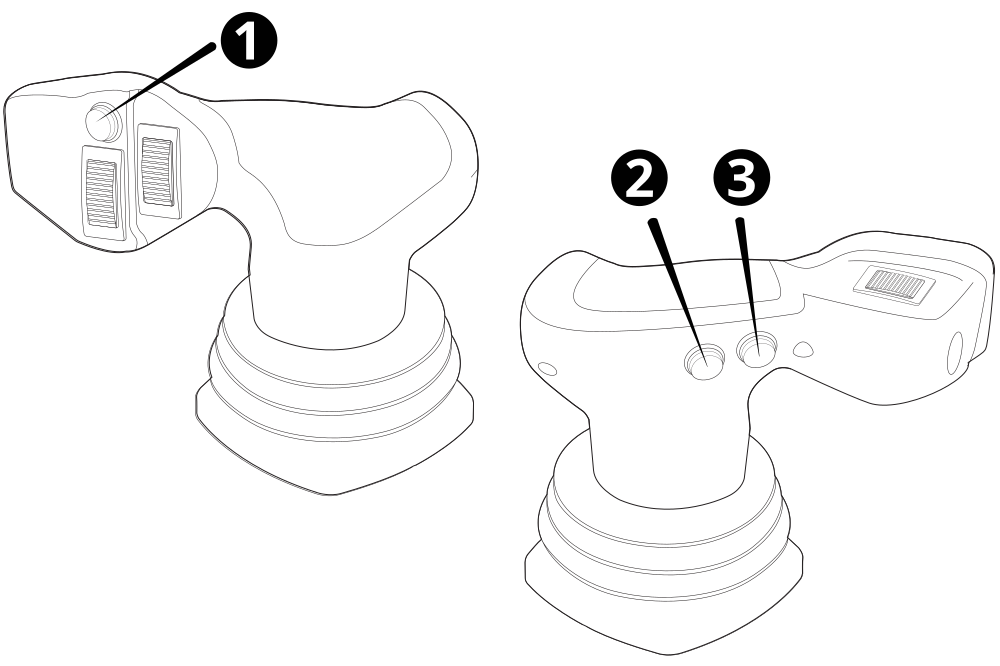
| 1 | Auto/Manual switch |
| 2 | Decrement switch |
| 3 | Increment switch |
ATI HMR rotary dial for grader blade attachments
The rotary knob and each button on the HMR rotary dial has backlight Red Green Blue (RGB) LEDs. The color of the LED confirms the current mode you are in.
The rotary dial shown in the image below lets you:
-
Engage Autos. Select between Left Autos (1), Right Autos (3) or combined Left and Right Autos (2).
Each press of the selected auto switch will cycle between Auto (green LED) and Manual (red LED).
-
Increase or decrease the elevation offset (4) or the target cross slope. Dial left to decrement. Dial right to increment.
Depth and Slope mode or Design mode Operator + Cross Slope sensor combination Increase or decrease the elevation offset. Increase or decrease the target cross slope. The center of the rotary dial is a switch to control the increment or decrement elevation focus. The default is Combined (blue LED), press once to change to Left only (green LED). Press again to change to Right only (red LED), press again to return to Combined (blue LED).
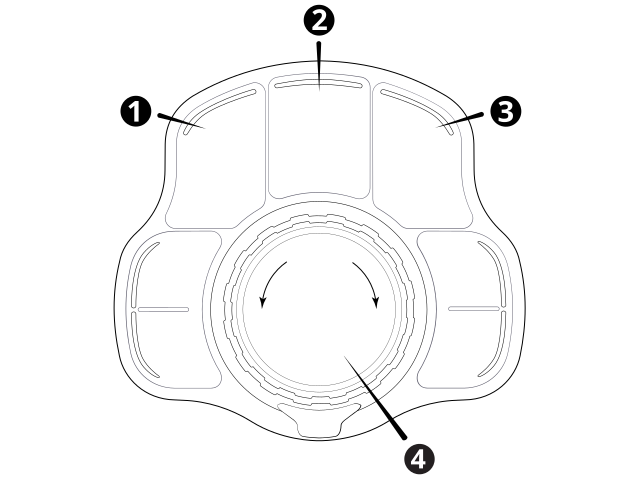
| 1 | Left Autos switch |
| 2 | Combined Autos switch (Left and Right) |
| 3 | Right Autos switch |
| 4 | Increment/Decrement switch |
ATI joystick switch for PD-Series box blade attachments
The joystick switch shown in the image below lets you:
-
Engage Autos.
Each press of the auto switch (1) cycles between Auto and Manual.
NOTE – Lift or Lift and Tilt Autos will engage, depending on the selected mode.
-
Increase or decrease the elevation offset or target blade slope using the increment and decrement (2) rocker switch.
Autos State Mode Action Autos Depth and Slope mode or Design mode Increase or decrease the elevation offset. Autos Operator + Blade Slope sensor combination The increment and decrement rocker switch increases and decreases the target cross slope. Manual N/A Raise or lower the blade.
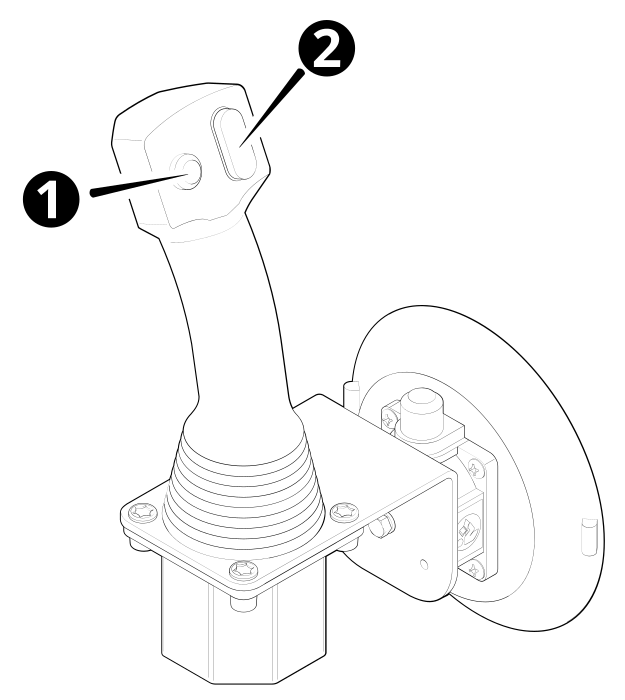
| 1 | Auto/Manual switch |
| 2 | Increment /Decrement switch |
