Joystick Switches on Cat D3-series Compact Track Loader Machines
The Cat supported attachments are:
GB120/GB124 grader blade
The following sections describe the functions of the joystick switches shown in the image below:
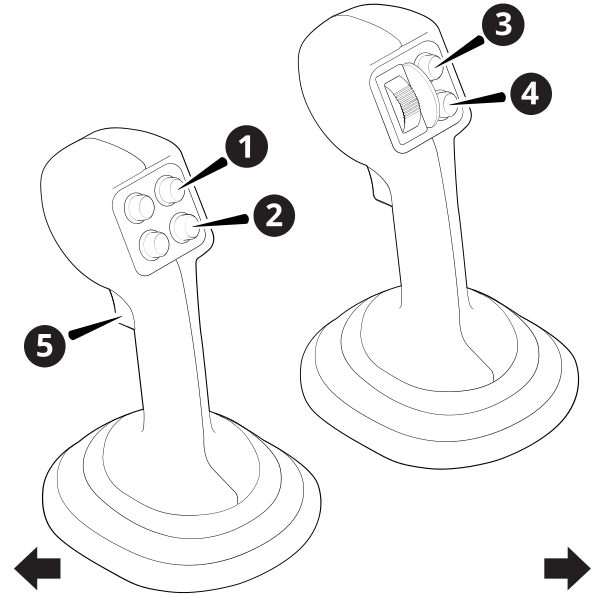
| 1 | Increment switch | 2 | Decrement switch | 3 | Increment switch |
| 4 | Decrement switch | 5 | Auto/Manual switch |
Engage Autos
Each press of the Auto/Manual switch (5) cycles between Auto and Manual.
There are three joystick modes available on Cat D3–series compact loaders when using the GB12x grader blade attachment. These modes affect the actions of the joysticks and the Auto/Manual switch (5). These modes are set in the Cat Machine Display via the Worktool Settings screen.
-
Tandem Mode: Cylinders move in coordinated motion. Fore-aft joystick movement will raise and lower both cylinders at the same speed. Side-to-side joystick movement will drive the cylinders in opposite directions, tilting the blade. The Auto/Manual switch (5) will put both left and right sides in Auto or Manual.
NOTE – This is the primary joystick mode when in operation.
-
Left Mode: Cylinders move independently. Fore-aft joystick movement will raise and lower the left cylinder. Side-to-side joystick movement will raise and lower the right cylinder. The Auto/Manual switch (5) will only put the right side in Auto or Manual.
-
Right Mode: Cylinders move independently. Fore-aft joystick movement will raise and lower the right cylinder. Side-to-side joystick movement will raise and lower the left cylinder. The Auto/Manual switch (5) will only put the left side in Auto or Manual.
Change the elevation offset or target cross slope
Increase or decrease the elevation offset or target cross slope using the increment (1 or 3) and decrement (2 or 4) switches on the side you want to change.
| Autos State | Mode | Action |
|---|---|---|
| Autos | Depth and Slope mode or Design mode | Increase or decrease the elevation offset. |
| Autos | Operator + Cross Slope sensor combination | Increase or decrease the target cross slope. |
| Manual | N/A | Additional machine functions. |
BB12x box blade
The joystick switches shown in the image below let you:
-
Engage Autos.
Each press of the auto switch (5) cycles between Auto and Manual.
NOTE – Both Left and Right Autos will engage.
-
Increase or decrease the elevation offset or target blade slope using the increment (1 or 3) and decrement (2 or 4) switches on the side you want to change.
Autos State Mode Action Autos Depth and Slope mode or Design mode Increase or decrease the elevation offset. Autos Operator + Blade Slope sensor combination The operator side goes into Autos ready (gray) and the increment and decrement buttons raise and lower the operator side.
The target blade slope side goes into Autos (green) and the increment and decrement buttons increase and decrease the target blade slope.
Manual N/A Raise or lower the blade.
| 1 | Increment switch | 2 | Decrement switch | 3 | Increment switch |
| 4 | Decrement switch | 5 | Auto/Manual switch |
Engage Autos
Each press of the Auto/Manual switch (5) cycles between Auto and Manual.
Cat Smart dozer blade attachment
The following sections describe the functions of the joystick switches shown in the image below:
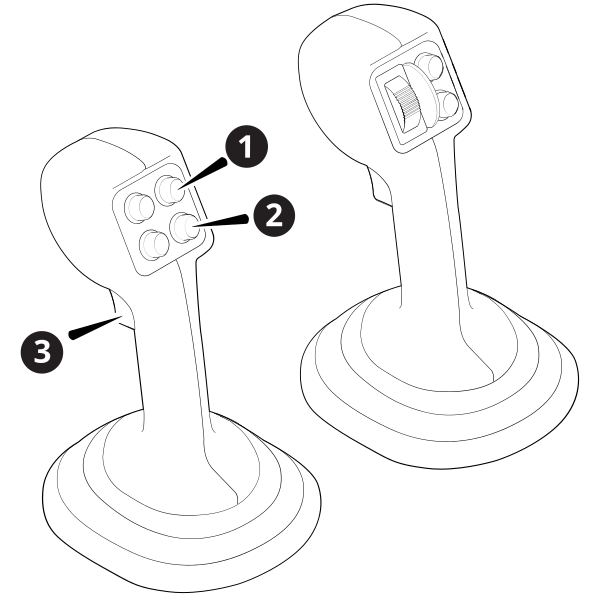
| 1 | Increment switch | 2 | Decrement switch | 3 | Auto/Manual switch |
Engage Autos
Each press of the Auto/Manual switch (3) cycles the system between Auto and Manual.
NOTE – This switch also cycles between Auto and Manual on Cat Operator Assist.
There are two joystick modes available on Cat D3–series compact loaders when using the Cat Smart dozer blade attachment. These modes affect the actions of the right joystick and the Auto/Manual switch (3). These modes are set in the Cat Machine Display via the Worktool Settings screen.
-
Tilt Mode: Fore-aft joystick movement will dump and tilt back the work tool cylinders. The Auto/Manual switch (3) will put both the attachment curl and blade tilt in Auto or Manual.
NOTE – This is the joystick setting required for using Dual GNSS.
-
Lift Mode: Fore-aft joystick movement will raise and lower the lift arm cylinders. The Auto/Manual switch (3) will put both the lift arms and blade tilt in Auto or Manual.
Change the elevation offset
Increase or decrease the elevation offset by using the increment (1) and decrement (2) switches on the left joystick.
| Autos State | Mode | Action |
|---|---|---|
| Autos | Depth and Slope mode or Design mode | Increase or decrease the elevation offset. |
| Manual | N/A | Additional machine functions. |
