Lever Switches on Komatsu EH 7 series machines
You can use certain switches on the left and right levers to perform common tasks while keeping your hands close to the machine controls. The lever switches only function when you are in the work screen.
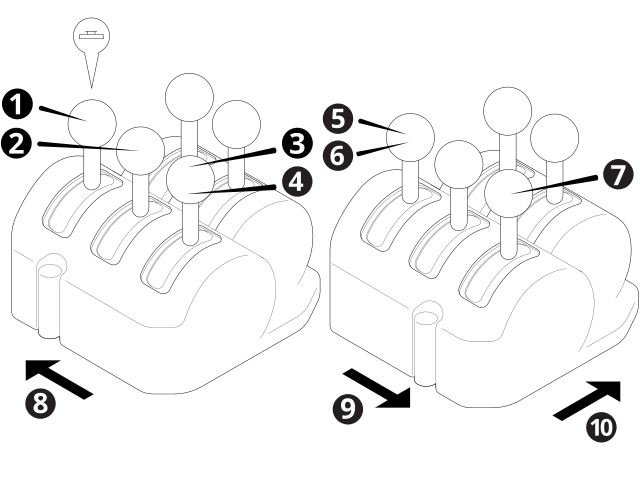
| 1 |
Left Autos switch |
2 |
Sideshift Autos switch |
| 3 |
Decrement elevation switch |
4 |
Increment elevation switch |
| 5 | Decrement elevation switch | 6 | Increment elevation switch |
| 7 |
Right Autos switch |
8 | Left lever console |
| 9 | Right lever console |

|
Front of machine |
Left levers
The left lever switches let you:
-
Engage Left Autos (1).
Each press of the auto switch will cycle between Auto and Manual.
-
Increment (4) or decrement (3) the elevation offset or the target cross slope.
Depth and Slope or Design mode and lasers and sonics Cross Slope guidance Increase or decrease the elevation offset. Increase or decrease the target cross slope. -
Engage Sideshift Autos (2).
NOTE – You must also engage Left or Right Autos when you use Sideshift Autos.
Each press of the sideshift switch will cycle between Auto and Manual.
Right levers
The right lever switches let you:
-
Engage Right Autos (5).
Each press of the auto switch will cycle between Auto and Manual.
-
Increment (7) or decrement (6) the elevation offset or the target cross slope.
Depth and Slope or Design mode and lasers and sonics Cross Slope guidance Increase or decrease the elevation offset. Increase or decrease the target cross slope.
