Remote Switch Configuration for machines with a Trimble Valve Module
You can use the remote switches to perform common tasks while keeping your hands close to the machine controls. The remote switches only function when you are in the work screen.
The remote switches lets you:
-
Engage Left Autos (1) and Right Autos (5).
You can toggle the switch to the engaged or disengaged position.
-
Engage Sideshift Autos (2).
You can toggle the switch to the engaged or disengaged position.
NOTE – You must also engage Left or Right Autos when you use Sideshift Autos.
- Increase or decrease the elevation offset or target cross slope (3 and 4).
NOTE – Remote switch placement may vary based on manufacturer and lever configuration. The following image shows typical locations for the motor grader remote switches.
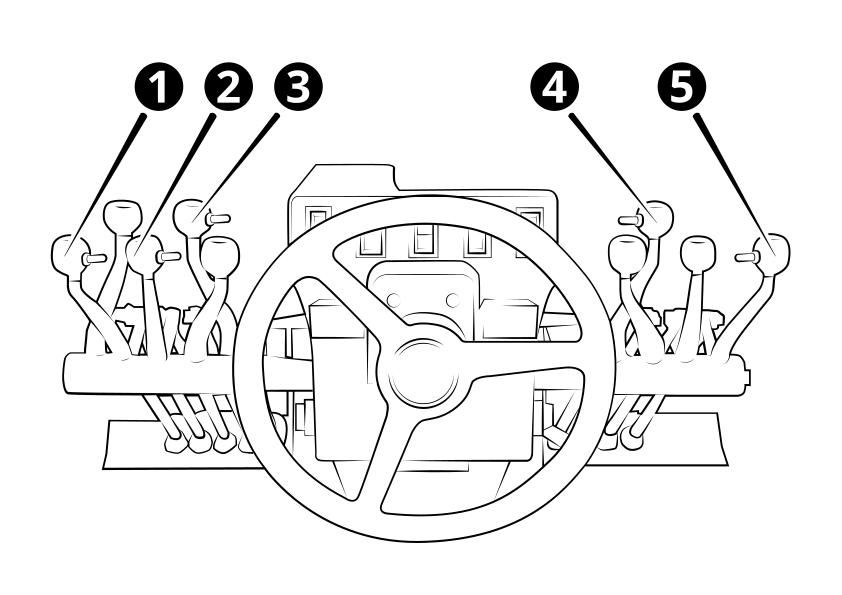
| 1 | Left Auto switch on left blade lift lever. | 2 | Sideshift Auto switch on sideshift lever. |
| 3 | Elevation offset / target cross slope switch on moldboard roll lever. | 4 | Elevation offset / target cross slope switch on articulation lever. |
| 5 | Right Auto switch on right blade lift lever. |
