Remote Switch Configuration for machines with steering control
You can use the remote switch to perform common tasks while keeping your hands close to the machine controls. The remote switch only functions when you are in the work screen.
Vertical offset remote switch
The vertical offset remote switch lets you:
-
Engage Autos (1).
Each press of the auto switch will cycle between Auto and Manual.
- Increase (2) or decrease (3) the elevation offset.
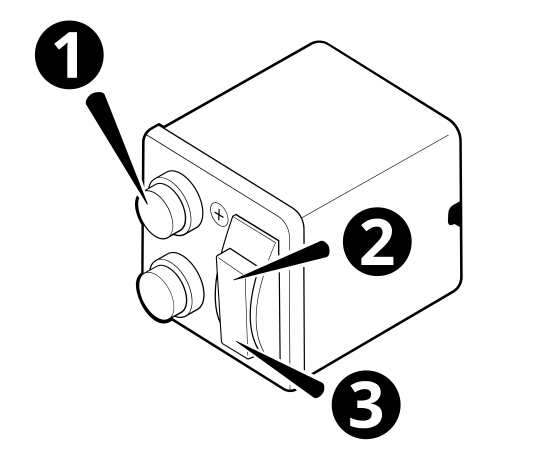
| 1 |
Auto switch. |
2 |
Increment elevation offset switch. |
| 3 | Decrement elevation offset switch. |
Horizontal offset remote switch
The horizontal offset remote switch lets you:
-
increment (2) or decrement (1) the Pass Shift count
-
increment (4) or decrement (3) the horizontal offset
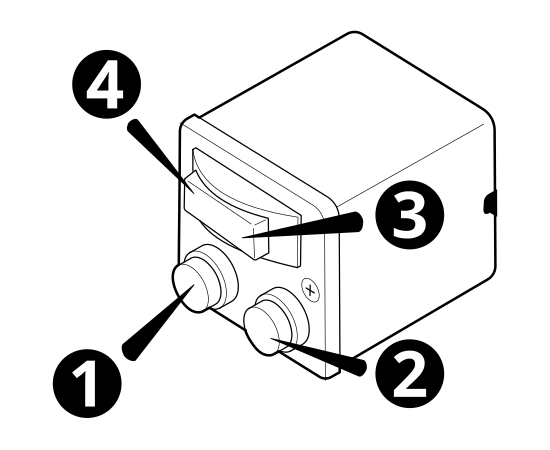
| 1 |
Decrement Pass Shift count switch. |
2 |
Increment Pass Shift count switch. |
| 3 | Increment Horizontal Distance D switch. | 4 | Decrement Horizontal Distance D. |
