Rotate Corridor Leg Properties
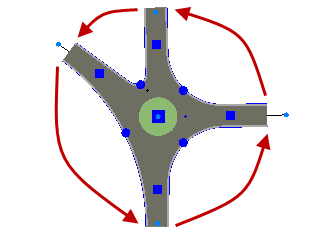
Use the Rotate Legs command to move the properties of one or more intersection legs to other legs when they import to the wrong positions. Often, these properties will affect how the leg geometry is formed as well.
Prerequisites:
- Licensed module; See the Subscription Plans page. For a license matrix by command, see the License page in the TBC Community. Also see View and manage licensed features.
- Two or more legs (connected to the same intersection)
To access the command:
- Select an intersection or leg, right-click and select Rotate Legs.
The properties from each leg are shifted to the next leg in the counter-clockwise direction.
Dependencies:
- None
