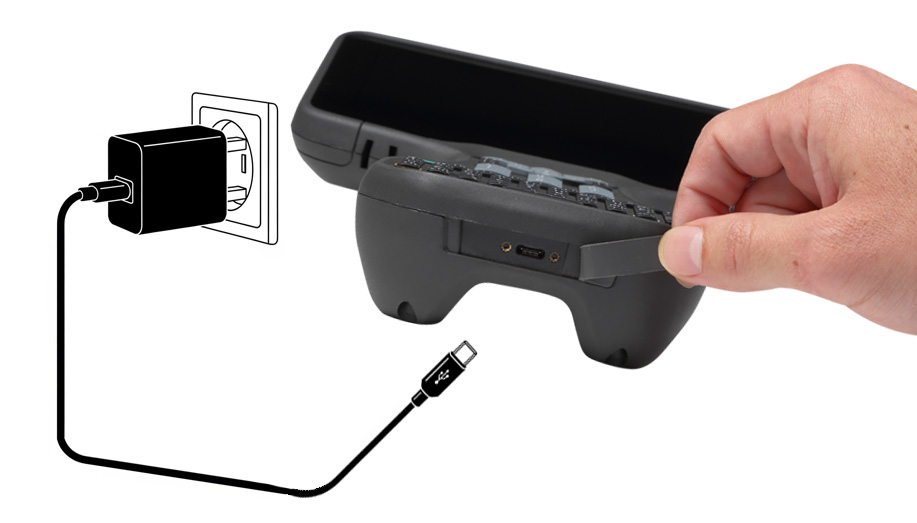
Charging the device for the first time
All current devices shipped by Trimble are shipped in Shelf mode; the device must be connected with a USB cable and a power adapter into an electrical outlet before the device can be turned on. See About Shelf mode for more information.
The internal battery is charged using the USB‑C port directly on the bottom of the device. It takes approximately 3.5 hours to fully charge the device's internal battery from an empty state using the AC adapter and USB‑C to USB‑C cable included in the packout. If the optional removable accessory battery pack is installed, it can also be charged while in the device; the total time to fully charge both internal and accessory batteries, when in an empty state, is approximately 8 hours.
NOTE – The accessory Li-35 battery part number 220200 is compatible with the TSC710 controller.
The older Li-35 battery part number 120200 is not compatible with the TSC710 controller. The ridge/grip design on the sides of the battery will not allow an older battery part number 120200 to be installed in the TSC710 controller.
Check the label on the battery for the part number.
NOTE – It may take longer to charge the batteries if you use third party AC adapters, or PC \ laptop USB Ports.
-
Connect the appropriate international plug adapter for your region to the AC adapter.
-
Connect one end of the USB‑C to USB‑C cable to the USB‑C port located on the AC adaptor.
-
Connect the other end of the USB‑C cable to the USB‑C port on the TSC710 controller.
-
Plug the power supply into an electrical outlet and charge for 3.5 hours (internal battery only), or 8 hours if the optional removable battery is also installed.