Drain water
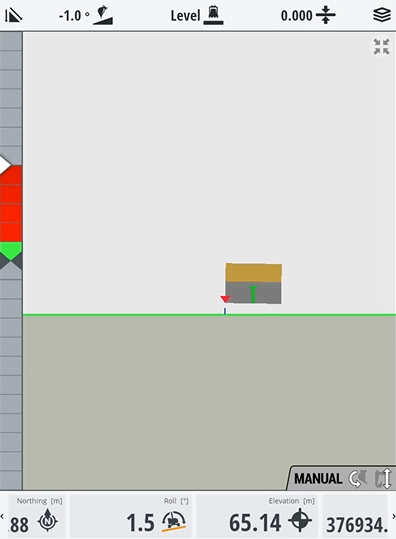
You can use to dig a basic trench to drain water and prevent unwanted pools on a site.
EXAMPLE – Once you've created a flat pad you could put a cross-slope on it to drain water away from the site.
To drain water you need to bench the heading so you know which way the water will go.
Watch the video
Learn how to use Trimble Earthworks to dig a basic trench to drain water on a site.
Step by step
-
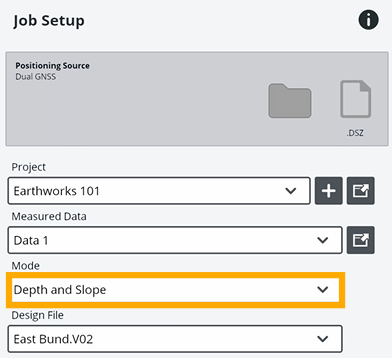
Tap Job Setup on the Dashboard.
-
For Mode, select Depth and Slope.
-
Tap Apply.
-
Tap Start.
-
Tap the bench heading
 icon.
icon.NOTE – In this scenario we want water to fall in front of the machine.
-
Tap the bench elevation
_25x25.png) icon
icon -
To put a fall on the drain, tap and hold the Mainfall level
_25x25.png) icon.
icon.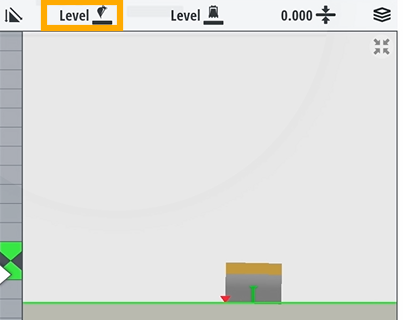
-
To specify the degree for the fall, drag the slider or enter a value in the Mainfall field.
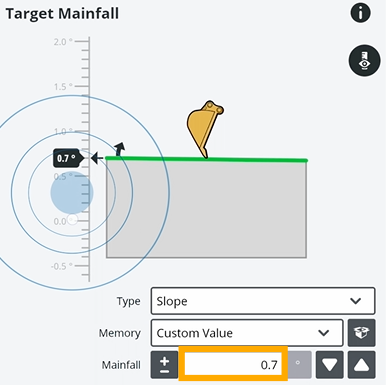
EXAMPLE – You might want water to fall by 1°. If you enter -1, the water will flow down in front of where your machine is facing.
-
Tap Apply.
-
Drive the machine to where you want to start the drain.
-
Start digging back to where you took your first point.