Understanding the Difference Between Local and Global Coordinates
In Trimble Business Center, global lat/long heights are in terms of a global coordinate datum, which in most modern cases is the global reference datum used to express reference positions in each country.
Local Lat/Long heights are in terms of a local coordinate datum, which is a datum that is a regional best fit, rather than a global best fit. The Australian Geodetic Datum (AGD 1966) is an example of a local coordinate datum.
With GNSS positioning, you start with a global coordinate from the receiver. You then transform this on to a local coordinate datum (for example, GDA66). Next, you apply a map projection to get the grid or planer coordinate in North, East, and Elevation.
Note: If you are importing NGS Data Sheets or OPUS solutions to use in a site calibration, you can easily convert the GNSS local coordinates used in those solutions to global coordinates, which are required when performing the site calibration. Expand the base point node in the Project Explorer, right-click the local coordinate, and select Change Local to Global. Another solution is to disable the grid /local coordinates or terrestrial stations for these base points.
Local/regional datum’s are becoming less common. Most geo-science/land information government departments are moving to global datum’s for satellite positioning. This is why some times the local and global are the same, as they are with GDA94, and sometimes they vary, as they do with AGD66.
Read-only point coordinates are displayed in the Points Properties pane  as shown here...
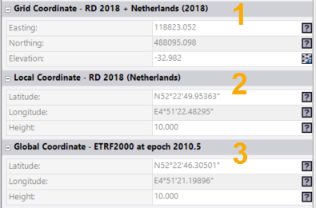
1. Grid Coordinate - A grid coordinate is a standard projected coordinate consisting of an easting, northing, and elevation in the zone and geoid model specified for the project's coordinate system. Grid coordinates may be adjusted, when required, using the Local Site Settings or Site Calibration command. The zone name and geoid model name are displayed in the Grid Coordinate section header.
2. Local Coordinate - A local coordinate consists of a latitude, longitude, and ellipsoidal height in the geodetic datum associated with the project's coordinate system zone. The parameters used to transform between global and local coordinates are displayed on the Datum transformation tab in Project Settings > Coordinate System. The parameters may be null when the global and local datum are the same. The local datum name is displayed in the Local Coordinate section header.
3. Global Coordinate - A global coordinate consists of a latitude, longitude, and ellipsoidal height in the global reference datum specified for the project's coordinate system. The global reference datum is used to express reference positions in the specified country. This ensures that VRS coordinates can be imported as global coordinates, while RTX coordinates are automatically converted from ITRF2014 at the measurement epoch to the global reference datum. The global reference datum name and global reference epoch are displayed in the Global Coordinate section header.
Notes:
- To make changes to the project's coordinate system, select Project Settings in the Quick Access Toolbar and select Coordinate System in the left pane. See Coordinate System Settings for additional instructions.
- When a site calibration has been performed or you are using ground coordinates in the project, the Grid Coordinate section label is replaced by Calibrated Coordinate or Ground Coordinate.
- A geoid model is optional in TBC. When no geoid is specified, the elevation of a grid coordinate is the same as the local ellipsoidal height. In this case, the grid coordinate will be defined using only the coordinate system zone.
- When “WGS 1984” is specified as the global reference datum in the project, time-dependent transformations are deactivated in TBC because the global reference datum is unknown. In this case, the label “WGS 1984” is still used for consistency with other software, but no reference epoch is provided.
Related topics
Calibrate a Site
Understanding Site Calibration
