Understanding Dynamic Compaction for DPS900
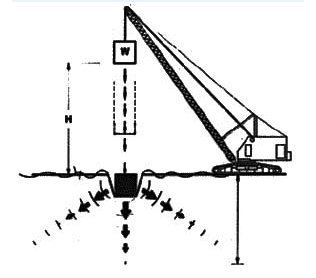
Dynamic compaction is a method of compaction that involves of dropping a heavy weight (tool) repeatedly on the ground at regularly spaced intervals. The tool and the height of the drop determine the amount of energy and therefore compaction, which may vary depending in the type of earthwork material at the drop location.
Compaction planning in Trimble Business Center enables you to:
- Create compaction plans to send to DPS900, a Trimble dynamic positioning system for compaction; the compaction plan helps the DPS900 machine operator navigate to drop locations, and then guides him in dropping a weight until the desired quality targets are met.
- Export compaction plans to DPS900 as Project Link files (.vcl).
- Visualize and analyze planned drop locations versus as-built drop results in the Plan View and 3D View.
Prerequisites
- One or more licenses; See the Subscription Plans page. For a license matrix by command, see the License page in the TBC Community. Also see View and manage licensed features.
Compaction Plans
A dynamic compaction plan is a pattern of drop locations that cover an area of earthwork material that needs to be to be stabilized. The spacing and orientation of each drop location in the plan is specified by parameters.
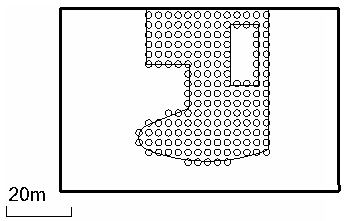
Compaction plans appear in the Project Explorer. The attributes of a compaction plan can be viewed and edited in the Properties pane, after which the plan can be rebuilt.
Drop Locations
A drop location is the compacted area that is formed where the tool impacts the ground. The tool is a typically a cylindrical or cubical weight that is suspended by a cable from a crane and then dropped. The displacement (vertically downward) of the soil at the drop location is determined by the energy of the drop (tool weight x gravity x height of the drop). When the tool hits the ground, the compaction energy radiates conically downward and outward from the drop location. Therefore, the drop locations do not need to overlap one another to achieve relatively uniform compaction below the surface.
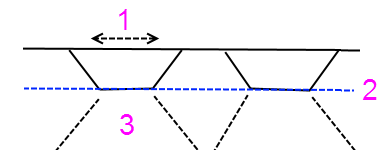
- Drop location at existing surface elevation
- Compacted elevation; impact compactors will finish compaction here
- Zone of compacted material
Figure: Dynamic compaction drop location
Drop locations are named with the scheme column number:row number. The plan's orientation defines the positive numbering direction. Using the area to be compacted, the origin, grid spacing, grid layout, and orientation, the program computes the grid point closest to the area as the location of the first drop location. This usually results in row and column numbers that are positive.
Importing and Exporting Dynamic Compaction Plans and Results
Trimble Business Center enables you to export compaction plans out as Project Link (.vcl) files, and then re-import a quality compaction plan (As-built) file (.xml) once compaction has been completed in the field.
DPS900 supports importing compaction plans in .vcl format and as-built result files in .xml format (both with just drop location names and coordinates).
