Display Project Properties
Tap All Projects from the Menu panel. The Projects page displays all available projects, each as a thumbnail. In addition to the project name and the time-stamp information, each thumbnail contains the followings:
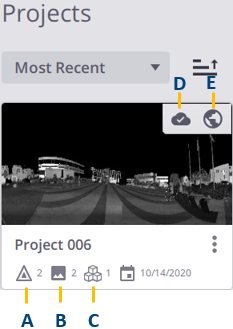
- A - Number of stations (see Manage Stations).
- B - Number of panoramas (see Create Panoramas).
- C - Number of registration sets (see Edit and Register Registration Sets).
- D - If the project has been refined (see Refine a Project (or Registration Set(s)).
- E - If the project has been georeferenced (see Georeference a Project).
